
BlackBerry Z30 Logic board Replacement

Hans and one other contributor
Last updated on Sep 7, 2016
Views: 4.7K
View statistics:
- Past 24 Hours:
- 3
- Past 7 Days:
- 23
- Past 30 Days:
- 93
- All Time:
- 4,716
Comments: 0
No one has left comments on this guide. Will you be first?
Go to guide commentsCompleted: 4 5
4 people have marked this guide "completed." Will you be next?
5 people have marked this guide "completed." Including you — great job!
Favorites: 2 3
2 people have favorited (and subscribed to) this guide. Will you be next?
3 people have favorited (and subscribed to) this guide — including you!
Action Shots
Be an action hero! This guide needs images that better demonstrate how to perform specific actions.
Markup Mishap
This guide needs better markups. Help out by correcting or making some markup annotations.
Community-Contributed Guide
An awesome member of our community made this guide. It was not created by iFixit staff.
What you need


-
-
-
Remove the battery cover by grabbing the notch under the bottom speakers and lifting.
 Ask FixBot
-
-
-
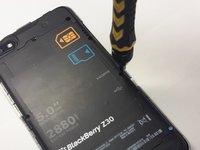
Remove the SIM card and the Media SD card by pushing on them.
-
-
-
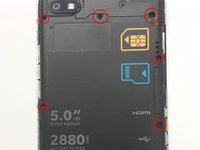
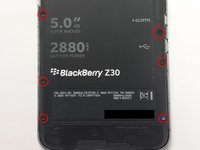
Locate and unscrew all 10 T5 screws around the back cover
-
-
-
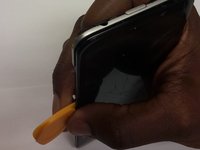
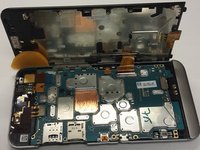
Use Plastic opening tools to separate the LCD from the Main body
-
-
-
-
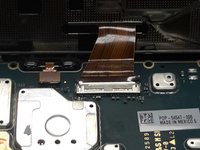
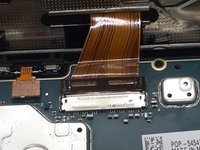
Use a plastic tool to carefully switch up the LCD ribbon holder
-
Detach the LCD from the main board
-
-
-
-
-
With a plastic tool, untie the system board by detaching the ribbons attached to it
-
The battery ribbon is on the bottom right
-
-
-
Power Button /Audio Jack
-
Flash
-
Rear Facing Camera
-
-
-
Once all Ribbons untied, gently wiggle the system board out of the frame
-
-








To reassemble your device, follow these instructions in reverse order.
Cancel: I did not complete this guide.
4 other people completed this guide.

