Up to 20% off select tools
Free Shipping on Domestic Orders $75+

BlackBerry 7280 Front Case Replacement

Views: 592

View statistics:

Past 24 Hours:
1
Past 7 Days:
2
Past 30 Days:
19
All Time:
592
Comments: 0

No one has left comments on this guide. Will you be first?

Go to guide comments
Completed: 0

No one has marked this guide "completed." Will you be the first?

Favorites: 0

No one has favorited (and subscribed to) this guide. Will you be the first?

Time Required: 5 - 10 minutes
Difficulty: Moderate
BlackBerry 7280 Front Case Replacement

What you need

Tools

Introduction

Go to step 1 ↓

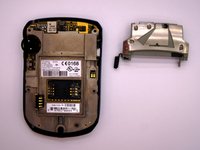
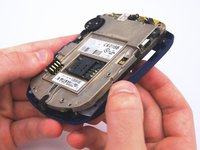
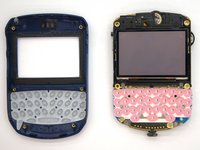
The outer shell of the BlackBerry 7280 contains two parts, the back case and the front case. This guide demonstrates how to remove the front case by unscrewing the supporting bracket and then prying the front case away.

    1. BlackBerry 7280 Front Case Replacement, Battery: step 1, image 1 of 3 BlackBerry 7280 Front Case Replacement, Battery: step 1, image 2 of 3 BlackBerry 7280 Front Case Replacement, Battery: step 1, image 3 of 3
      • With your thumb press down on the locking- button on the back of the BlackBerry 7280.

      • Slide the battery cover off the device.

      Ask FixBot

      Add Comment

    2. BlackBerry 7280 Front Case Replacement: step 2, image 1 of 2 BlackBerry 7280 Front Case Replacement: step 2, image 2 of 2
      • Remove the lithium-ion battery from the back of the device using your index finger.

      Ask FixBot

      Add Comment

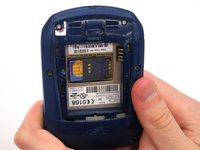
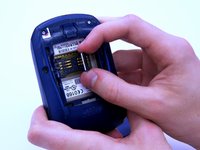
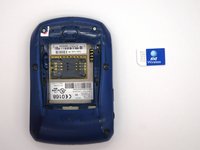
    1. BlackBerry 7280 Front Case Replacement, SIM Card: step 3, image 1 of 3 BlackBerry 7280 Front Case Replacement, SIM Card: step 3, image 2 of 3 BlackBerry 7280 Front Case Replacement, SIM Card: step 3, image 3 of 3
      • Hold the device with both hands.

      • Lift the SIM card holder using your thumb and index finger.

      • Remove the SIM card from the device.

      Ask FixBot

      Add Comment

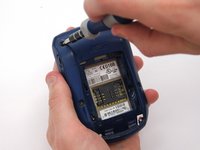
    1. BlackBerry 7280 Front Case Replacement, Back Case: step 4, image 1 of 2 BlackBerry 7280 Front Case Replacement, Back Case: step 4, image 2 of 2
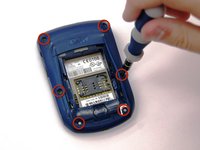
      • Using a Torx T6 screwdriver, remove all six 1/8 inch screws (marked in red) from the back case. Set screws aside.

      • The SIM card has been removed here to prevent damage to the card. This is recommended, but not not required.

      Ask FixBot

      Add Comment

    2. BlackBerry 7280 Front Case Replacement: step 5, image 1 of 2 BlackBerry 7280 Front Case Replacement: step 5, image 2 of 2
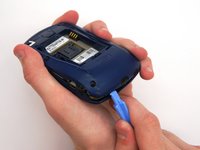
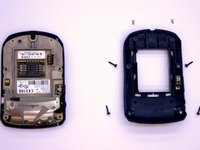
      • Use the plastic opening tool to pry the back case away from the front case.

      Ask FixBot

      Add Comment

    1. BlackBerry 7280 Front Case Replacement, Front Case: step 6, image 1 of 2 BlackBerry 7280 Front Case Replacement, Front Case: step 6, image 2 of 2
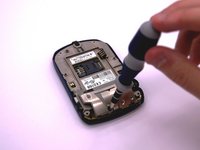
      • Using a Torx T6 screwdriver, remove the lone 1/8 inch screw that holds the upper metal bracket onto the larger metal bracket. Set aside the screw and the bracket.

      Ask FixBot

      Add Comment

    2. BlackBerry 7280 Front Case Replacement: step 7, image 1 of 2 BlackBerry 7280 Front Case Replacement: step 7, image 2 of 2
      • Remove the front plastic case from the metal bracket.

      Ask FixBot

      Add Comment

Conclusion

To reassemble your device, follow these instructions in reverse order.

Cancel: I did not complete this guide.

Author

with

Andrew Catlin

Member since: 03/11/13

16 Reputation

3 Guides authored

Team

Clemson, Team 12-2, Benson Spring 2013 Member of Clemson, Team 12-2, Benson Spring 2013

CLEM-BENSON-S13S12G2

4 Members

120 Guides authored

0 Guide Comments

Add Comment

View Statistics:

Past 24 Hours: 1

Past 7 Days: 2

Past 30 Days: 19

All Time: 592