Free Shipping on Domestic Orders $75+

Black and Decker PS1800 Case Replacement

Prerequisite Only
This is a prerequisite-only guide! This guide is part of another procedure and isn’t meant to be used alone.

What you need

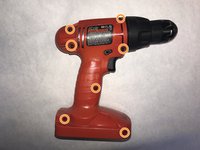
  1. Black and Decker PS1800 Case Replacement, Open the Outer Drill Case: step 1, image 1 of 2 Black and Decker PS1800 Case Replacement, Open the Outer Drill Case: step 1, image 2 of 2
    • Lay the drill on its side, assuring that the screw holes are facing upwards.

    • Remove seven 12 mm screws using a Phillips #00 screwdriver.

    Ask FixBot
  2. Black and Decker PS1800 Case Replacement: step 2, image 1 of 1
    • Separate the outer drill case to expose the components and switch.

    Ask FixBot
Conclusion

To reassemble your device, follow these instructions in reverse order.

One other person completed this guide.

Christian Aldrich

Member since: 10/12/16

253 Reputation

2 Guides authored

Team

IUPUI, Team 2-3, Baechle Fall 2016 Member of IUPUI, Team 2-3, Baechle Fall 2016

IUPUI-BAECHLE-F16S2G3

5 Members

6 Guides authored

0 Guide Comments

Add Comment

View Statistics:

Past 24 Hours: 1

Past 7 Days: 5

Past 30 Days: 36

All Time: 361