Introduction
The Bissell PowerFresh Steam Mop Pump works by drawing water from the tank, heating it with an internal element, and then pressurizing it to force the steam out through the mop head when the trigger is pressed. Any damage to the pump can cause leaks and reduce its effectiveness. This guide will walk you through on how to replace the pump.
Before you begin, turn off and unplug your mop.
What you need
-
-
-
-
Push down on the latch to release the mop head.
-
Pull the mop head off the body machine.
-
-
-
-
-
Use a Phillips #2 screwdriver to remove the 40 mm screw from the handle.
-
Slide the handle out.
-
-
-
-
Use a Phillips #2 screwdriver to remove the two 16 mm screws on the bottom of the unit.
-
Then slide the cover part off.
-
-
-
Use a Phillips #2 screwdriver to remove the ten 14 mm screws on the back of the unit.
-
-
-
Insert an opening tool into the seam between the front and back sections. Slide it around the perimeter to release the clips securing the casing.
-
Gently separate them.
-
Use a Phillips #2 screwdriver to remove two 14 mm screws from inside the unit.
-
-
-
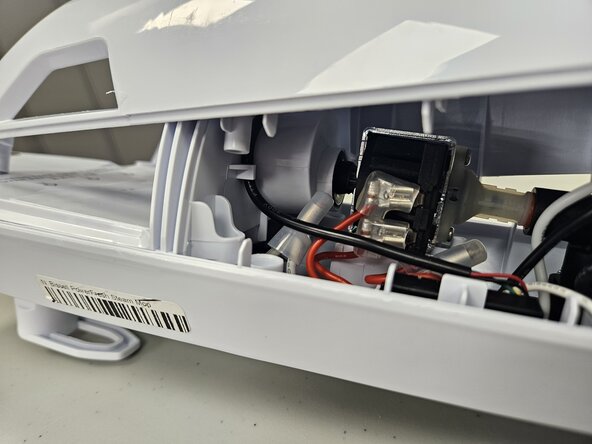
Pull the pump off the unit.
-
Gently wiggle the connectors side to side to loosen them, then pull them straight off.
-
-


 Ask FixBot




To reassemble your device, follow these instructions in reverse order. Take your e-waste to an R2 or e-Stewards certified recycler.
Cancel: I did not complete this guide.
One other person completed this guide.

Team

University of North Texas, Team 5-3, Kilpatrick Fall 2025 Member of University of North Texas, Team 5-3, Kilpatrick Fall 2025
UNT-KILPATRICK-F25S5G3
4 Members
60 Guides authored
