Free Shipping on Domestic Orders $75+

Bionaire BAP 600 Transformer Replacement

What you need

  1. Bionaire BAP 600 Transformer Replacement, Control Board: step 1, image 1 of 1
    • First, unplug the 7-pin connector.

  2. Bionaire BAP 600 Transformer Replacement: step 2, image 1 of 1
    • Next, unplug the 2 pin wires that connect the front LED’s.

  3. Bionaire BAP 600 Transformer Replacement: step 3, image 1 of 2 Bionaire BAP 600 Transformer Replacement: step 3, image 2 of 2
    • Next, remove the two screws.

  4. Bionaire BAP 600 Transformer Replacement: step 4, image 1 of 1
    • Next, unplug the pins and use scissors to cut the zip ties.

  5. Bionaire BAP 600 Transformer Replacement: step 5, image 1 of 3 Bionaire BAP 600 Transformer Replacement: step 5, image 2 of 3 Bionaire BAP 600 Transformer Replacement: step 5, image 3 of 3
    • Unplug the rest of the pin connections.

    • Remove the neutral and hot wires by pulling out the two black wires.

  6. Bionaire BAP 600 Transformer Replacement: step 6, image 1 of 3 Bionaire BAP 600 Transformer Replacement: step 6, image 2 of 3 Bionaire BAP 600 Transformer Replacement: step 6, image 3 of 3
    • Unscrew the two screws.

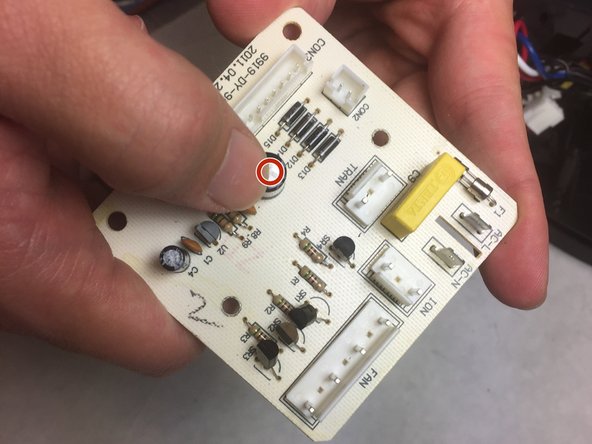
    • Inspect the capacitor for any bulges, as this is a sign that the capacitor must be replaced.

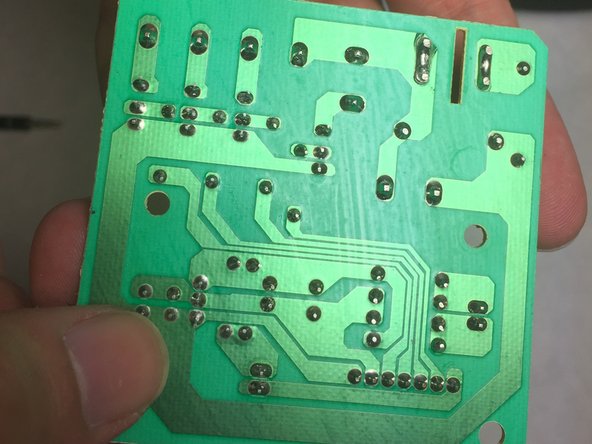
    • Look out for burnt solder on the back of the circuit board.

  7. Bionaire BAP 600 Transformer Replacement, Transformer: step 7, image 1 of 2 Bionaire BAP 600 Transformer Replacement, Transformer: step 7, image 2 of 2
    • Use a screwdriver to remove screws.

Conclusion

To reassemble your device, follow these instructions in reverse order.

Alexander Tarancon

Member since: 10/12/16

49 Reputation

2 Guides authored

Team

IUPUI, Team 4-4, Baechle Fall 2016 Member of IUPUI, Team 4-4, Baechle Fall 2016

IUPUI-BAECHLE-F16S4G4

5 Members

7 Guides authored

0 Guide Comments

Add Comment

View Statistics:

Past 24 Hours: 0

Past 7 Days: 6

Past 30 Days: 23

All Time: 364