Free Shipping on Domestic Orders $75+

Beko DHR73431W Capacitor Replacement

What you need

  1. Beko DHR73431W Capacitor Replacement, Capacitor: step 1, image 1 of 1
    • Remove the two Phillips 02 (cross-head) screws securing the lid

    • Capacitors store dangerous levels of electrical current, they must be discharged before handling. To begin UNPLUG the device from the mains, and let it sit for a few hours Make sure you let the power drain before opening BEWARE: it is possible for capacitors to store a life-threatening charge for months or years.

    • Before commencing work inside or attempting to handle the capacitor, very cautiously short the terminals to ground and dissipate any residual charge.

  2. Beko DHR73431W Capacitor Replacement: step 2, image 1 of 3 Beko DHR73431W Capacitor Replacement: step 2, image 2 of 3 Beko DHR73431W Capacitor Replacement: step 2, image 3 of 3
    • Unscrew and remove the five Phillips 02 cross-head screws of the side panel

    • Remove the single Phillips 02 cross-head screw on the bottom

    • Remove the two Phillips 21 cross-head screws from the top

  3. Beko DHR73431W Capacitor Replacement: step 3, image 1 of 3 Beko DHR73431W Capacitor Replacement: step 3, image 2 of 3 Beko DHR73431W Capacitor Replacement: step 3, image 3 of 3
    • WARNING! Discharge any residual current from the capacitor before continuing.

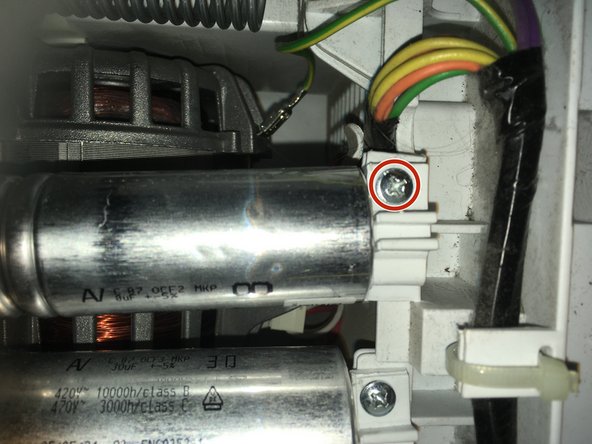
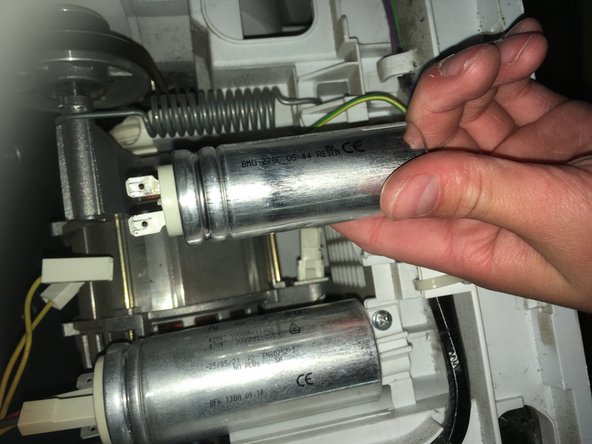
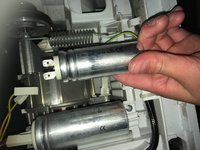
    • Remove the single Phillips 02 cross-head screw for the capacitor labeled with a large '8'.

    • Unplug the two connectors at the base of the capacitor

Conclusion

To continue, put in your new capacitor then follow the steps in reverse.

One other person completed this guide.

Daniel Grey

Member since: 10/21/21

162 Reputation

1 Guide authored

2 Guide Comments

very helpful. Many thanks

Muhammad Masood HUSSAIN - Reply Share

No worries, thank you

Daniel Grey - Share

Add Comment

View Statistics:

Past 24 Hours: 5

Past 7 Days: 28

Past 30 Days: 91

All Time: 2,549