
Beats Studio3 Wireless Battery Replacement

Lourdes Dejesus and 4 other contributors
Last updated on Jul 26, 2023
Views: 13K
View statistics:
- Past 24 Hours:
- 16
- Past 7 Days:
- 115
- Past 30 Days:
- 464
- All Time:
- 13,488
Comments: 6
2 comments on steps, 4 guide comments.
Go to guide commentsCompleted: 7 8
7 people have marked this guide "completed." Will you be next?
8 people have marked this guide "completed." Including you — great job!
Favorites: 0 1
No one has favorited (and subscribed to) this guide. Will you be the first?
1 person has favorited (and subscribed to) this guide — and that's you!
Incorrect Tools
Help make this guide better by using the correct tools in images and/or text.
Introduction
Go to step 1 ↓Use this guide to replace the battery in your Beats Studio3 Wireless headphones (model number: A1914).
The battery helps the Beats Studio3 Wireless headphones to power on. It's designed for long battery life of up to 22 hours for all-day. A failed battery will cause your Beats Studio3 Wireless to not turn on. You can take a look at the bottom right ear pad to check if the five lights are on. In some cases, your Beats Studio3 Wireless will have faulty charging due to a deteriorated battery.
What you need


-
-
-
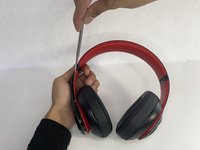
Use a pointed nylon spudger to remove the center circular panel on the right side of your device.
 Ask FixBot
-
-
-
Using a pointed nylon spudger, remove the tab located on the inner part of the headband labeled "R."
-
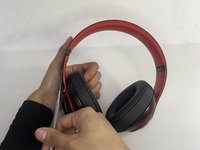
Place the nylon spudger in between the side panels and push inward going from bottom to top to separate both sides of the panel.
-
-
-
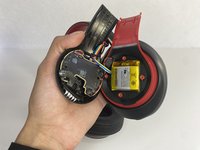
Place the nylon spudger underneath the battery, push inward and separate the battery from the inside.
-
-
-
-
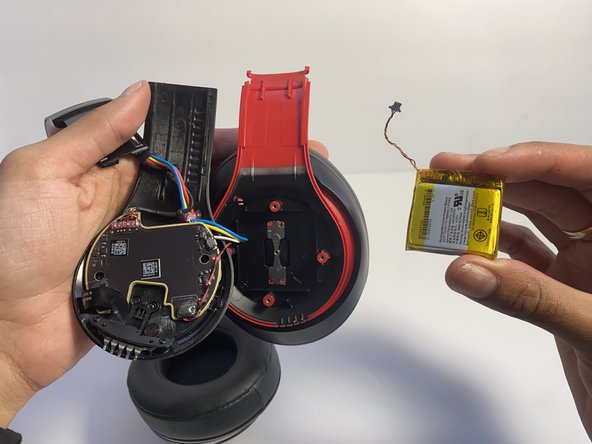
Use a nylon spudger to lift up the glue sticking the wires down.
-
Use a nylon spudger to lift the connector to disconnect the battery.
-
-




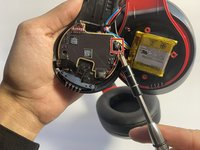
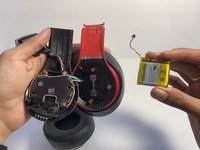
To reassemble your device, follow these instructions in reverse order.
Cancel: I did not complete this guide.
7 other people completed this guide.

Team

UMass Dartmouth, Team 7-4, Ryckebusch Spring 2023 Member of UMass Dartmouth, Team 7-4, Ryckebusch Spring 2023
UMASSD-RYCKEBUSCH-S23S7G4
3 Members
48 Guides authored
4 Guide Comments
Should the glue be reapplied or is it okay to simply place back on?
Tengo una duda mis audífonos la batería esta full de voltaje pero me marca un rojo y no me prenden q podría ser o que solución podría darle
