This translation was generated by a machine and has not been reviewed by a person yet. Speak this language? Review it.

Battery replacement on the Why! Tablet

Felice Suglia and one other contributor
Last updated on Sep 2, 2026
Views: 272
View statistics:
- Past 24 Hours:
- 4
- Past 7 Days:
- 15
- Past 30 Days:
- 95
- All Time:
- 272
Comments: 0
No one has left comments on this guide. Will you be first?
Go to guide commentsCompleted: 0 1
No one has marked this guide "completed." Will you be the first?
1 person has marked this guide "completed." It's you — great job!
Favorites: 0 1
No one has favorited (and subscribed to) this guide. Will you be the first?
1 person has favorited (and subscribed to) this guide — and that's you!
Community-Contributed Guide
An awesome member of our community made this guide. It was not created by iFixit staff.
Missing Details
Some of this guide's details are missing. Help users by adding tools, difficulty, or time.
Introduction
Go to step 1 ↓This guide, along with it's prerequisites covers battery replacement on the Why! Tablet.
What you need
Tools

-
-
-
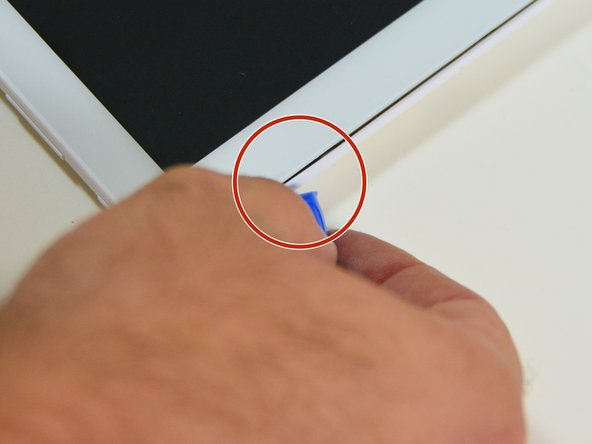
Using a plastic opening tool, insert the tip into the corner of the tablet, between the screen and the rear case.
-
Gently pry to start separating the rear case at this corner.
 Ask FixBot
-
-
-
Slide the opening tool along the edge of the tablet to release the rear case fasteners, reinserting the tool at other points along the perimeter as needed.
-
Once the perimeter is clear, lift and remove the rear case to access the internal components (motherboard, battery).
-
-
-
-
-
Locate the two connectors shown on the motherboard, near the camera module.
-
Using a screwdriver, remove the screw near the battery.
-
Remove the screw on the edge of the housing, next to the cable.
-
-
-
Remove the screw near the corner of the battery.
-
Using the opening tool, disconnect the connector located near the edge of the motherboard, next to the camera module.
-
Disconnect the connector on the left edge of the motherboard.
-
-
-
-
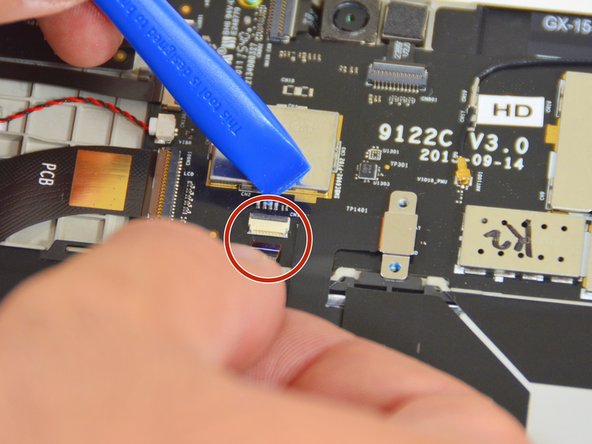
Disconnect the small white connector in the center of the motherboard.
-
Disconnect the connector on the left edge, near the battery label.
-
Disconnect the battery connector, in the upper right corner of the motherboard.
-
-
-
Disconnect the last connector on the edge of the motherboard.
-
Gently lift the battery to free it from its recess, then remove it from the tablet.
-
-






To reassemble your device follow these instructions in the reverse order.
Special thanks to these translators:
100%

Juan Garcia is helping us fix the world! Want to contribute?
Start translating ›

