Introduction
Hello and welcome to the battery replacement guide on the Steelseries Arctis Pro / Black headset. The defect is noticeable through spontaneous shutdown and short battery life.
What you need
-
-
-
Remove the earpads. These are fixed by a band on the short sides.
-
The Band is fixed with the earpads. You cant loose it.
-
To remove:
-
Grab the earpad on one of the shorter sides.
-
Pull on the earpad carefully, until the band slips out of the guide bar.
 Ask FixBot
-
-
-
Remove the Cover of the right Earpice.
-
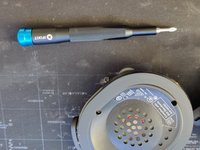
For this, remove the three screws with an J0-Screwdriver
-
All Screws are the same size and can be used at any of those locations.
-
The speaker is magnetic. We recommend carefully removing the screws and storing them safely at a safe distance. They can be attracted by the magnet.
-
-
-
-
Use a soldering iron to carefully desolder the three wires of the old battery from the circuit board.
-
Remember the colors and their positions, so you can resolder it in the correct locations.
-
Desolder the cables one by one and make sure to isolate them instantly afterwards. This is very important, because we don´t want to cause a short.
-
Pull the battery out. You will need some strength - it is attaced using doubel sided tape.
-
-
-
Apply a small piece of double-sided tape to the designated area of the mount.
-
Insert the new battery and press it gently to ensure it is securely in place.
-
Resolder the three cables on the circuit board
-
In my case the new battery is from CELLONIC. But other companys work as well. The original battery was a 1100mAh 4.07Wh rated Voltage 3.7Vd.c.
-
-
-
Reinsert the speaker into the case.
-
Secure it with the three screws you removed earlier. These screws are embedded in plastic, so don't overtighten them.
-
Now test the function of the new battery before reattaching the ear pads:
-
Connect the headset to a charging cable.
-
Check if the charging process starts and if the headset can be turned on.
-
Optional: Use a USB meter to check charging speed, voltage, or mAh value.
-
-
-
First, insert the earpad into the corresponding guide at the top.
-
Carefully pull down until the band slips in the bottom bar.
-
Inserting the cushion requires a bit of finesse – take your time to ensure it is positioned neatly and evenly.
-
-




Conrgatulations! You have sucsessfully changed the battery on your Headset. Have fun with your new battery.
Cancel: I did not complete this guide.
5 other people completed this guide.
Special thanks to these translators:
100%

Toby is helping us fix the world! Want to contribute?
Start translating ›
