Free Shipping on Domestic Orders $75+

BLU WIN HD LTE Camera Replacement

What you need

    1. BLU WIN HD LTE Camera Replacement, Back Case: step 1, image 1 of 1
      • Pry the back cover from the bottom of the phone, pulling outwards and upwards.

      Ask FixBot

      Add Comment

    2. BLU WIN HD LTE Camera Replacement: step 2, image 1 of 1
      • Fully remove the cover and set aside in a safe place.

      Ask FixBot

      Add Comment

    1. BLU WIN HD LTE Camera Replacement, Frame Cover: step 3, image 1 of 1
      • Remove all the nine 2mm screws using the JIS #00 Screwdriver.

      Ask FixBot

      Add Comment

    2. BLU WIN HD LTE Camera Replacement: step 4, image 1 of 1
      • Pry the frame off using the spudger pulling upwards going to different areas around the device.

      • The back cover is secured by glue. Removal could be more difficult than expected.

      Ask FixBot

      Add Comment

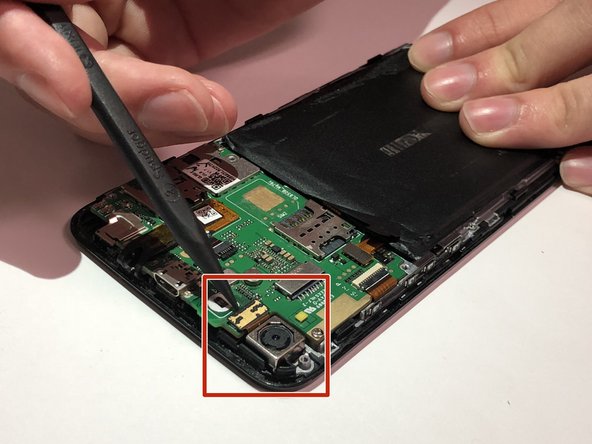
    1. BLU WIN HD LTE Camera Replacement, Camera: step 5, image 1 of 3 BLU WIN HD LTE Camera Replacement, Camera: step 5, image 2 of 3 BLU WIN HD LTE Camera Replacement, Camera: step 5, image 3 of 3
      • Pry off the low profile connector located on the right side of the camera device.

      Ask FixBot

      Add Comment

    2. BLU WIN HD LTE Camera Replacement: step 6, image 1 of 1
      • Pull the camera out.

      Ask FixBot

      Add Comment

Conclusion

To reassemble your device, follow these instructions in reverse order.

Cancel: I did not complete this guide.

0 Guide Comments

Add Comment

View Statistics:

Past 24 Hours: 6

Past 7 Days: 18

Past 30 Days: 68

All Time: 638