
BLU Vivo One Plus Battery Replacement

Keely Mashburn and 2 other contributors
Last updated on Dec 12, 2019
Views: 2.7K
View statistics:
- Past 24 Hours:
- 2
- Past 7 Days:
- 18
- Past 30 Days:
- 78
- All Time:
- 2,671
Comments: 0
No one has left comments on this guide. Will you be first?
Go to guide commentsCompleted: 1 2
1 person has marked this guide "completed." Will you be next?
2 people have marked this guide "completed." Including you — great job!
Favorites: 0 1
No one has favorited (and subscribed to) this guide. Will you be the first?
1 person has favorited (and subscribed to) this guide — and that's you!
Needs Better Images
Better photos will improve this guide. Help out by taking, editing, or uploading new ones!
Introduction
Go to step 1 ↓Repower your device by changing its battery. This guide instructs you how to remove the back of the phone and access the battery to safely remove it. If your battery is not performing to the level that you expect of it or if you simply would like to replace it, this guide will show you how to do that. It is a bit more difficult than previous BLU models but with some tools and time you can get it done.
What you need
Tools
-
-
-
Spudger4.9
-


-
-
Tool used on this step:SIM Card Eject Tool$2.99
-
Use the SIM Card Eject Tool to remove the SIM card slot from the phone.
-
Using a Phillips 000 screwdriver, remove the 1.5 mm metal screw located inside the SIM card slot gap.
 Ask FixBot
-
-
Tool used on this step:iFixit Opening Tool$1.99
-
Use the plastic opening tool and run it under the entire seam that separates the screen and the plastic back of the phone.
-
Lodge the plastic opening tool under the back cover and use it to pry the two parts apart slowly.
-
This step will take a decent amount of force and it may seem as though the device will fracture, but you must keep pulling until the back releases.
-
-
Tool used on this step:Phillips #000 Screwdriver$5.49
-
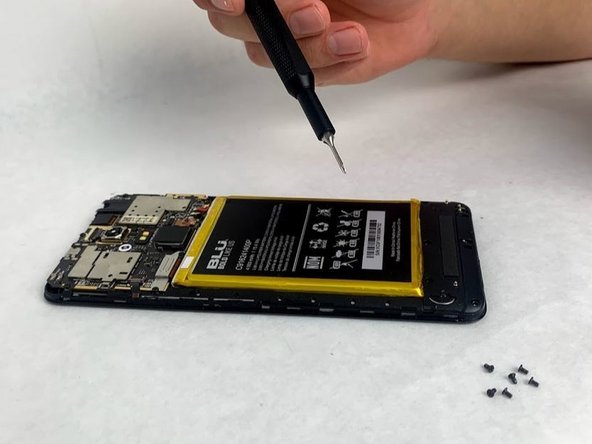
Using a Phillips 000 screwdriver, remove the 14 1.5 mm screws that attach the plastic protection cover to the phone.
-
Removing the screws will cause a silver metal bracket by the top left corner of the battery to fall off. Keep track of it for later.
-
-
Tool used on this step:Spudger$3.99
-
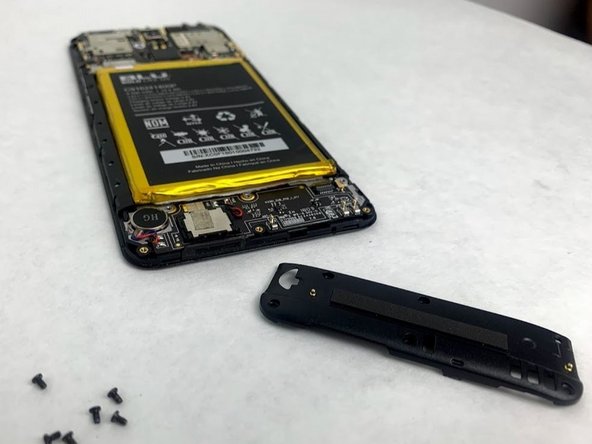
After removing the screws, the bottom plastic cover will need to be removed to expose the rest of the phone’s interior.
-
The plastic cover should come off easily using your fingers, but you may need the spudger or an opening pick to remove it.
-
Remove the cover by its sides to ensure the removal is as easy as possible.
-
-
-
Tool used on this step:iFixit Opening Picks (Set of 6)$4.95
-
Remove the two blue strips of tape on the lower portion of the battery.
-
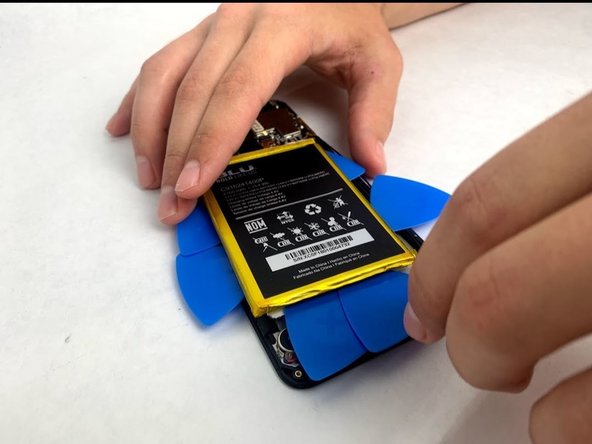
After removing the blue strips of tape gently begin wedging the plastic picks underneath the battery and locating the adhesive tape strips.
-
Utilize the picks in a fashion that both pries the battery upward and scrapes the adhesive either loose from the battery or phone body. Be careful not to bend or damage the battery and it should eventually come free from the housing.
-
-
-
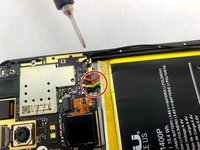
Desolder the three wires (red, yellow, black) that connect the battery to the motherboard in the top right-hand corner. Use the link listed to safely desolder your battery. Video link to desolder.
-
-








To reassemble your device, follow these instructions in reverse order.
Cancel: I did not complete this guide.
One other person completed this guide.

Team

Embry-Riddle Aeronautical University, Team S23-G1, McClure Fall 2019 Member of Embry-Riddle Aeronautical University, Team S23-G1, McClure Fall 2019
ERAU-MCCLURE-F19S23G1
4 Members
60 Guides authored
