Introduction
Replacing the Blu S91 Pro battery is an inexpensive and fairly easy process.
This guide walks you through safely removing and replacing the internal battery of the Blu S91 Pro. By following these steps, you can restore normal battery performance, extend the lifespan of your device, and avoid the cost of professional repair or full device replacement.
The battery in the Blu S91 Pro is a rechargeable lithium-ion cell that supplies power to all components of the phone. Like all lithium-ion batteries, it gradually loses capacity over time due to charge cycles, heat exposure, and general use. As it degrades, the phone may struggle to maintain a charge or deliver consistent power, affecting overall performance.
Lithium-ion batteries can be dangerous if punctured, bent, or overheated. If the battery appears swollen, do not press on it—handle it carefully. Use plastic tools instead of metal to prevent damage. Do not throw away old batteries in regular trash. Take the removed battery to a certified e-waste or battery recycling facility.
Following these precautions will help ensure a safer repair process and reduce the risk of damage to both you and your device.
What you need
-
-
-
Use the heat gun around the perimeter of the phone to loosen the adhesive under the cover.
-
Use a pry tool to lift the cover from the edges.
-
-
-
Slide the SIM slot out of the phone.
-
Push the bracket around the phone to the left, then upwards to remove it.
-
-
-
-
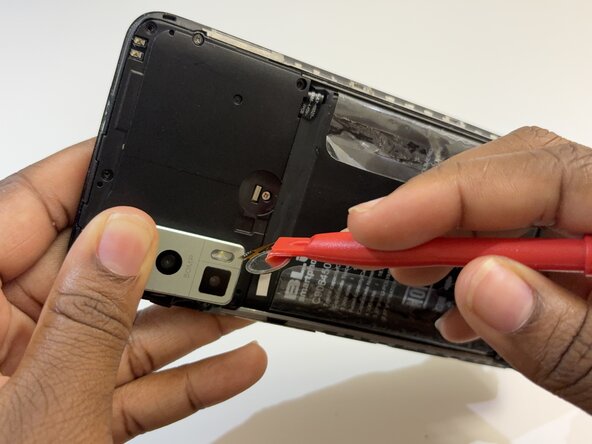
Use the pry tool to carefully lift the fingerprint sensor and expose the screw underneath.
-
-
-
Remove all seven 8 mm screws on the upper side of the phone using a Phillips #000 screwdriver to reveal the battery connector.
-
-
-
Lift the fingerprint sensor to disconnect it from the phone.
-
Lift the battery connector to disconnect it from the phone
-

 Ask FixBot




To reassemble your device, follow these instructions in reverse order.
Cancel: I did not complete this guide.
One other person completed this guide.

Team

Austin Community College, Team 78-3, Kapoor Spring 2026 Member of Austin Community College, Team 78-3, Kapoor Spring 2026
AUSTINCC-KAPOOR-S26S78G3
1 Member
12 Guides authored
