
BEM Mojo 2 Charging Base Battery Replacement

Rachel Iacoboni and 3 other contributors
Last updated on May 7, 2024
Views: 990
View statistics:
- Past 24 Hours:
- 3
- Past 7 Days:
- 14
- Past 30 Days:
- 66
- All Time:
- 990
Comments: 0
No one has left comments on this guide. Will you be first?
Go to guide commentsCompleted: 0 1
No one has marked this guide "completed." Will you be the first?
1 person has marked this guide "completed." It's you — great job!
Favorites: 0 1
No one has favorited (and subscribed to) this guide. Will you be the first?
1 person has favorited (and subscribed to) this guide — and that's you!
Introduction
Go to step 1 ↓Common issues that involve the charging base battery is when it cannot hold a charge while unplugged. It is important to know the difference between replacing the charging base's battery and speaker's battery. The charging base battery should be replaced for the reason listed above while the speaker's battery should only be replaced if the speaker will not power on, even when plugged into the Micro USB charger and to an AC adapter that is plugged into the wall.
What you need
Tools


-
-
-
Use the metal spudger to peel back the rubber from the bottom of the auxiliary charging base to reveal the screw.
 Ask FixBot
-
-
-
Use the screwdriver with the J0 bit attatched to detach all four 10 mm screws from the charging base.
-
-
-
Pull the top cover off of the charging base to reveal the internal chip.
-
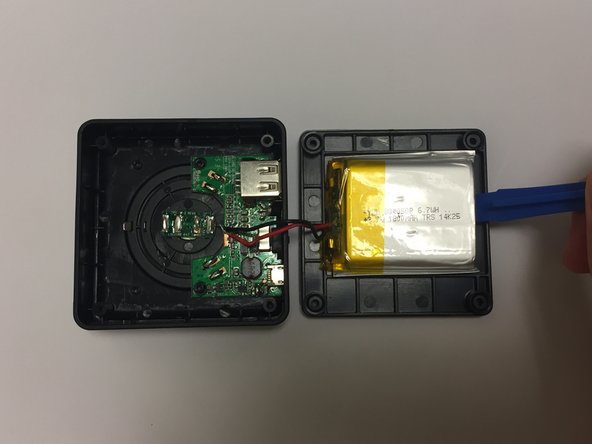
Use the plastic opening tool to pry the battery from the top cover.
-
-
-
Tool used on this step:Tweezers$4.99
-
Use the tweezers to carefully detach the wires from the internal chip.
-
-



To reassemble your device, follow these instructions in reverse order.

Team

Baylor, Team S1-G1, Johnson Spring 2018 Member of Baylor, Team S1-G1, Johnson Spring 2018
BU-JOHNSON-S18S1G1
3 Members
60 Guides authored
