
Azpen A909 Back Cover Replacement

Karoly Fodor and 5 other contributors
Last updated on Jan 15, 2026
Views: 877
View statistics:
- Past 24 Hours:
- 5
- Past 7 Days:
- 16
- Past 30 Days:
- 96
- All Time:
- 877
Comments: 0
No one has left comments on this guide. Will you be first?
Go to guide commentsCompleted: 0 1
No one has marked this guide "completed." Will you be the first?
1 person has marked this guide "completed." It's you — great job!
Favorites: 0 1
No one has favorited (and subscribed to) this guide. Will you be the first?
1 person has favorited (and subscribed to) this guide — and that's you!
Introduction
Go to step 1 ↓Before you begin replacing or fixing the internal components of your Azpen A909 tablet, you will need to take the back cover off. This guide demonstrates how to remove the cover.
What you need
Tools


-
-
-
Begin by unscrewing the two 1.4 mm diameter Phillips #00 head screws at the top of the device.
 Ask FixBot
-
-
-
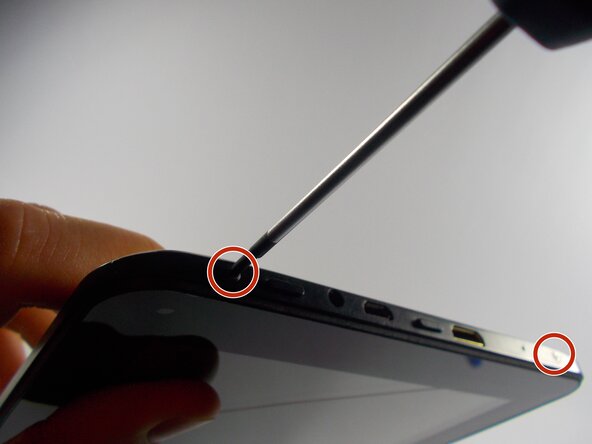
Next, gently pry the cover off with a plastic opening tool or a similar instrument by loosening all of the anchoring points. Two of the anchoring points are circled in the image. Avoid excessive bending or pivoting, since doing so may break the anchoring points.
-
-
-
-
After prying open all of the anchoring points, the cover will lift off of the tablet.
-
-


To reassemble your device, follow these instructions in reverse order.

Team

UMass Dartmouth, Team 3-5, Duarte Spring 2015 Member of UMass Dartmouth, Team 3-5, Duarte Spring 2015
UMASSD-DUARTE-S15S3G5
3 Members
72 Guides authored
