
Azpen A720 Back Cover Replacement

Last updated on Jul 7, 2025
Views: 902
View statistics:
- Past 24 Hours:
- 2
- Past 7 Days:
- 20
- Past 30 Days:
- 97
- All Time:
- 902
Comments: 2
2 comments on steps.
Completed: 0 1
No one has marked this guide "completed." Will you be the first?
1 person has marked this guide "completed." It's you — great job!
Favorites: 0 1
No one has favorited (and subscribed to) this guide. Will you be the first?
1 person has favorited (and subscribed to) this guide — and that's you!
Better Introduction
Improve this guide by completing or revising its introduction.
Missing Details
Some of this guide's details are missing. Help users by adding tools, difficulty, or time.
Introduction
Go to step 1 ↓All of the key components that could fail are accessed by removing the Azpen A720 back cover. The process will include removing a couple of screws and then utilizing the plastic opening tool to pry the cover apart from the body of the device.
What you need
Tools


-
-
-
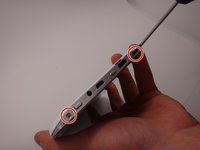
Use a Phillips #00 screwdriver to remove the two 4mm screws found on the top edge of the tablet near the power button.
 Ask FixBot
-
-
-
Use the plastic opening tool to pry the white back from the silver frame. Start near the micro SD slot.
-
-
-




To reassemble your device, follow these instructions in reverse order.

Team

Michigan Tech, Team 1-3, Lauer Spring 2015 Member of Michigan Tech, Team 1-3, Lauer Spring 2015
MTU-LAUER-S15S1G3
2 Members
60 Guides authored
