Free Shipping on Domestic Orders $75+

Audio-Technica AT-LP120-USB Outer Shell Replacement

What you need

  1. Audio-Technica AT-LP120-USB Outer Shell Replacement, Outer Shell: step 1, image 1 of 3 Audio-Technica AT-LP120-USB Outer Shell Replacement, Outer Shell: step 1, image 2 of 3 Audio-Technica AT-LP120-USB Outer Shell Replacement, Outer Shell: step 1, image 3 of 3
    • Remove the inner steel plate that spins on the turntable.

    • Carefully lift up the plate.

    • Place it near your device out of the way.

    Ask FixBot

    Add Comment

  2. Audio-Technica AT-LP120-USB Outer Shell Replacement: step 2, image 1 of 1
    • Remove the power cord in the back of the device.

    Ask FixBot

    Add Comment

  3. Audio-Technica AT-LP120-USB Outer Shell Replacement: step 3, image 1 of 1
    • Ensure that the Tone Arm clamp is in place.

    Ask FixBot

    Add Comment

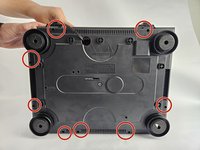
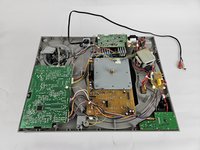
  4. Audio-Technica AT-LP120-USB Outer Shell Replacement: step 4, image 1 of 2 Audio-Technica AT-LP120-USB Outer Shell Replacement: step 4, image 2 of 2
    • Use a Phillips #2 screwdriver to remove the eight 2 mm screws holding the back casing into place.

    • Carefully remove the back casing from the device to expose the interior.

    Ask FixBot

    Add Comment

Conclusion

To reassemble your device, follow these instructions in reverse order.

Cancel: I did not complete this guide.

One other person completed this guide.

David

Member since: 10/31/24

253 Reputation

2 Guides authored

Team

Cuesta, Team 20-3, Krynen Fall 2024 Member of Cuesta, Team 20-3, Krynen Fall 2024

CUESTA-KRYNEN-F24S20G3

5 Members

6 Guides authored

0 Guide Comments

Add Comment

View Statistics:

Past 24 Hours: 2

Past 7 Days: 7

Past 30 Days: 40

All Time: 349