
Asus Zenfone 10 SIM Card Replacement

Lee Hunt and one other contributor
Last updated on Oct 16, 2025
Views: 973
View statistics:
- Past 24 Hours:
- 6
- Past 7 Days:
- 37
- Past 30 Days:
- 182
- All Time:
- 973
Comments: 0
No one has left comments on this guide. Will you be first?
Go to guide commentsCompleted: 0 1
No one has marked this guide "completed." Will you be the first?
1 person has marked this guide "completed." It's you — great job!
Favorites: 0 1
No one has favorited (and subscribed to) this guide. Will you be the first?
1 person has favorited (and subscribed to) this guide — and that's you!
Community-Contributed Guide
An awesome member of our community made this guide. It was not created by iFixit staff.
What you need
Tools

-
-
-
If a case is installed, remove it.
-
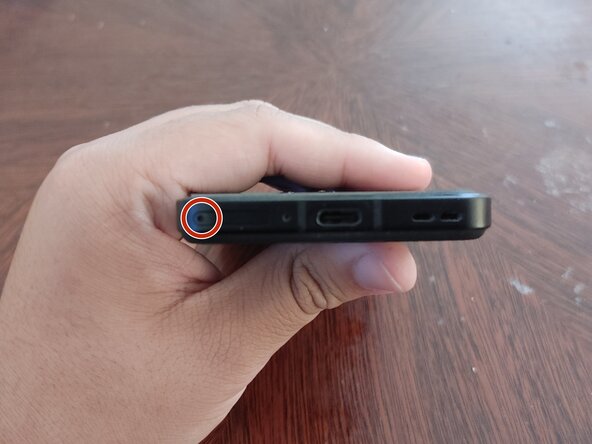
Locate the SIM eject hole on the left side of the SIM tray.
 Ask FixBot
-
-
-
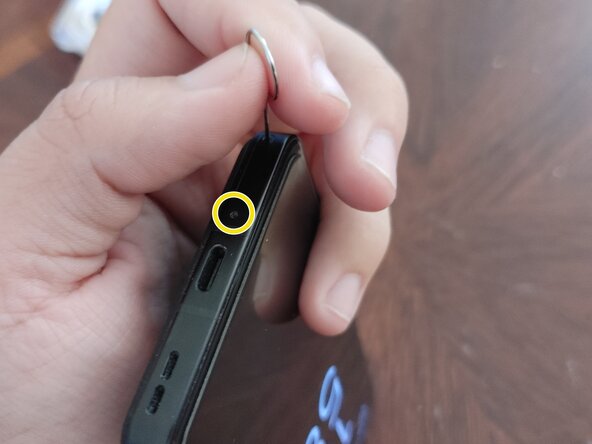
Insert a SIM eject tool (or an unfolded paper clip, if you don't have a tool) into the SIM eject hole.
-
-
-
-
Once the SIM tray pops out, remove the SIM eject tool.
-
A "SIM card is not installed" message will appear on the screen, provided the phone is turned on.
-
-


To re-insert the SIM card(s), insert them contact-side-up, ensuring that the notches are aligned with the notches in the tray. Then, re-insert the tray, with the eject hole facing left, provided the Zenfone is screen-side-up.

