
Asus ZenWatch 2 Speaker Replacement

Moriah and one other contributor
Last updated on May 26, 2017
Views: 1.7K
View statistics:
- Past 24 Hours:
- 1
- Past 7 Days:
- 13
- Past 30 Days:
- 81
- All Time:
- 1,703
Comments: 3
1 comment on steps, 2 guide comments.
Go to guide commentsCompleted: 2 3
2 people have marked this guide "completed." Will you be next?
3 people have marked this guide "completed." Including you — great job!
Favorites: 0 1
No one has favorited (and subscribed to) this guide. Will you be the first?
1 person has favorited (and subscribed to) this guide — and that's you!
Introduction
Go to step 1 ↓The Asus ZenWatch 2 has a small speaker installed within the back side of the removable casing. This speaker serves a variety of functions from alerting users of incoming notifications to playing audio files such as music on the device. This guide will show users how to replace it if the part has become damaged or inoperable.
What you need
Tools
-
Spudger4.9


-
-
-
Remove the four 3.5mm screws to detach the case using the T5 screwdriver.
 Ask FixBot
-
-
-
-
-
-
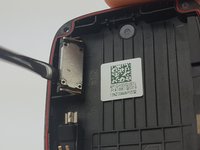
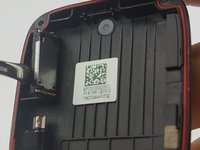
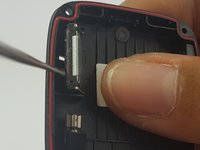
Slide the metal spudger under the speaker and lift to remove it from the casing.
-
-





To reassemble your device, follow these instructions in reverse order.
Cancel: I did not complete this guide.
2 other people completed this guide.

Team

USF Tampa, Team S1-G1, Leahy Spring 2017 Member of USF Tampa, Team S1-G1, Leahy Spring 2017
USFT-LEAHY-S17S1G1
3 Members
60 Guides authored
2 Guide Comments
Any idea where one might find a replacement for this speaker? Not having any luck in my search.
y el altavoz lo venden ?
