
Asus ZenPad Z8 Camera Replacement

mohamed sharif and 4 other contributors
Last updated on Mar 24, 2021
Views: 1.6K
View statistics:
- Past 24 Hours:
- 2
- Past 7 Days:
- 12
- Past 30 Days:
- 67
- All Time:
- 1,550
Comments: 2
2 comments on steps.
Completed: 1 2
1 person has marked this guide "completed." Will you be next?
2 people have marked this guide "completed." Including you — great job!
Favorites: 0 1
No one has favorited (and subscribed to) this guide. Will you be the first?
1 person has favorited (and subscribed to) this guide — and that's you!
Needs More Images
A few more images would make this guide's procedures crystal clear.
Introduction
Go to step 1 ↓This guide will show you how to replace the Asus ZenPad Z8 Tablet's back-camera. If you have followed all of the other steps on the troubleshooting guide and they've failed to solve the problem, replacing the camera may be your best bet.
What you need
Tools
-
-
Spudger4.9


-
-
-
Turn off the power. The tablet has a hard power switch located on the right side.
 Ask FixBot
-
-
-
Unscrew the screws located on the bottom and use the prying tool to open the tablet.
-
-
-
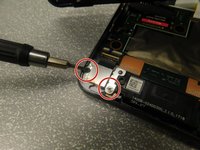
Unscrew the two screws that hold the camera onto the back cover. Each screw is located on either side of the camera.
-
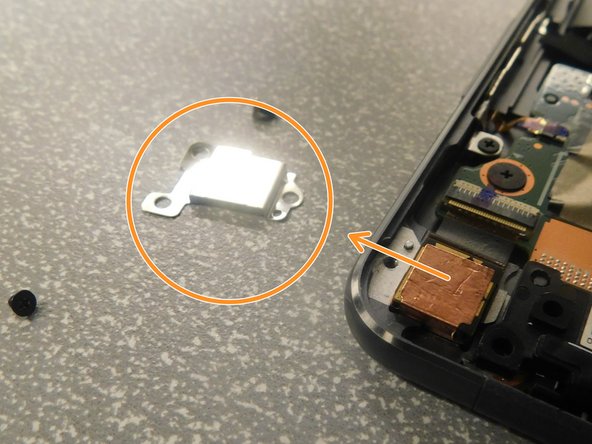
Remove the camera cover piece.
-
-
-
-
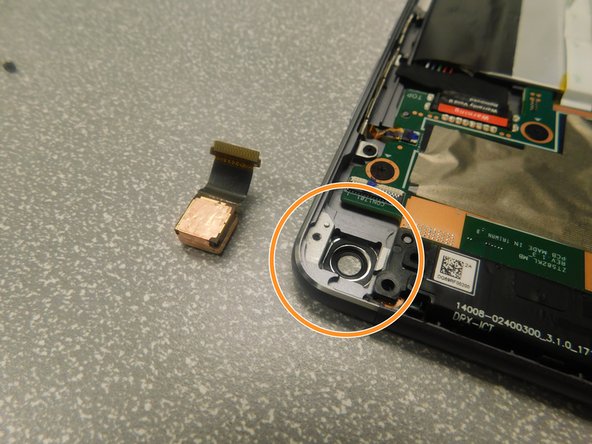
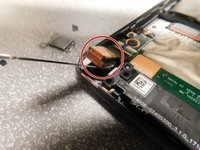
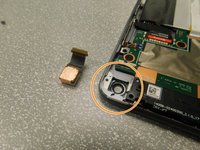
Use a prying tool to separate the camera, then pull to completely remove it.
-
Reinstall the new camera, camera cover, and screws.
-
-



To reassemble your device, follow these instructions in reverse order.
Cancel: I did not complete this guide.
One other person completed this guide.

Team

Gateway, Team S1-G4, Saknee Spring 2019 Member of Gateway, Team S1-G4, Saknee Spring 2019
GCC-SAKNEE-S19S1G4
4 Members
12 Guides authored
