
Asus ZenFone 5 Motherboard Replacement

Aaron Michael Melton and 7 other contributors
Last updated on May 23, 2024
Views: 2.6K
View statistics:
- Past 24 Hours:
- 5
- Past 7 Days:
- 15
- Past 30 Days:
- 70
- All Time:
- 2,596
Comments: 0
No one has left comments on this guide. Will you be first?
Go to guide commentsCompleted: 2 3
2 people have marked this guide "completed." Will you be next?
3 people have marked this guide "completed." Including you — great job!
Favorites: 0 1
No one has favorited (and subscribed to) this guide. Will you be the first?
1 person has favorited (and subscribed to) this guide — and that's you!
Introduction
Go to step 1 ↓This is a guide on how to replace the motherboard of an Asus ZenFone 5. The tools needed are a Spudger, a Halberd Spudger, an iOpener, iFixit Opening Picks, iFixit Opening Tool, and a Phillips #00 Screwdriver. There are many parts at risk of being damaged, ensure that you follow the procedure with care. The time needed to complete this procedure is approximately forty-five to fifty-five minutes.
What you need
Tools
-
Spudger4.9
-
-
-


-
-
-
Insert a SIM card removal tool or the end of a paperclip into the small hole on the lefthand side of the phone to release the SIM card.
-
Pull out the SIM card tray.
 Ask FixBot
-
-
-
Use a plastic opening pick to pry into the crease between the back cover and the midframe of the phone.
-
Move all the way around the phone until the back cover is separated from the rest of the phone.
-
-
-
-
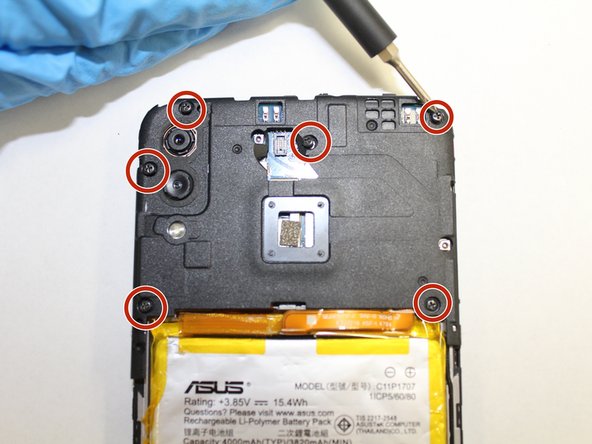
Using a Phillips #00 screwdriver, remove the six screws across the top mid frame and gently lift the top assembly piece. It should detach easily and can be set aside.
-
-
Tool used on this step:Halberd Spudger$2.99
-
Use a halberd spudger to pry up the battery's press fit connector from the motherboard.
-
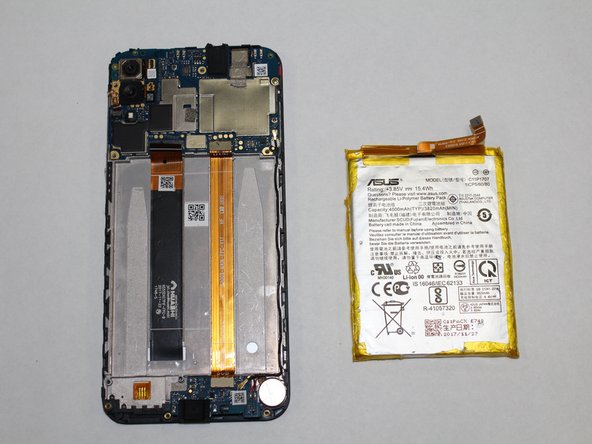
Gently pry the battery out of the case, taking care not to bend or puncture the battery.
-
-
-
Gently use a spudger to remove the wired connections on the motherboard.
-
Disconnect both ribbon cables by popping up the locking tab of the zif connectors and pulling the cable out.
-
Pry up the black coaxial cable and it will pop off its connector on the motherboard.
-
Remove the two screws holding down the motherboard with a Phillips #00 screwdriver.
-
-
-
Insert the pointed end of a spudger into the red rubber divot underneath the motherboard.
-
Gently pry the motherboard from the device.
-
-






To reassemble your device, follow these instructions in reverse order.
Cancel: I did not complete this guide.
2 other people completed this guide.

Team

The Citadel Military College of South Carolina, Team S3-G20, Eggleston Fall 2020 Member of The Citadel Military College of South Carolina, Team S3-G20, Eggleston Fall 2020
CMCSC-EGGLESTON-F20S3G20
3 Members
36 Guides authored
