Introduction
This guide will walk you through the process of replacing a broken or faulty keyboard on the Asus X751L.
What you need
-
-
-
With the screen closed, place your laptop upside-down with the front facing you.
-
Remove the six 14.6mm Phillips #00 screws.
-
Remove the four 6.6mm Phillips #00 screws.
 Ask FixBot
-
-
-
-
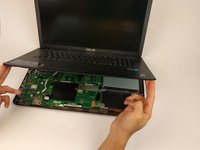
Flip the laptop over and open the lid.
-
Pry around the edges of the laptop base using the plastic opening tool.
-
-
-
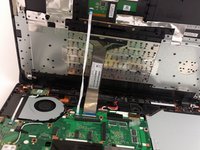
Carefully lift the keyboard up.
-
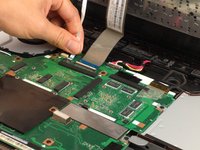
Disconnect the two ZIF connectors from the motherboard using your fingernail to lift the cream-colored tab.
-
-


To reassemble your device, follow these instructions in reverse order.
Cancel: I did not complete this guide.
3 other people completed this guide.

Team

USF Tampa, Team 17-2, Blackwell Spring 2017 Member of USF Tampa, Team 17-2, Blackwell Spring 2017
USFT-BLACKWELL-S17S17G2
4 Members
60 Guides authored
1 Guide Comment
Looks easy enough, I have a Polish version qwertz keyboard , a 752L model-17" anyone know a compatible UK qwerty keyboard as a replacement? - or or a k. board shared with another model that will fit ? Asus service centre are less than helpful .!
