Free Shipping on Domestic Orders $75+

Asus X55C Optical Drive Replacement

What you need

Video Overview

    1. Asus X55C Optical Drive Replacement, Keyboard: step 1, image 1 of 1
      • Switch off the laptop and remove the battery.

      Ask FixBot

      Add Comment

    2. Asus X55C Optical Drive Replacement: step 2, image 1 of 3 Asus X55C Optical Drive Replacement: step 2, image 2 of 3 Asus X55C Optical Drive Replacement: step 2, image 3 of 3
      • The Keyboard is held by 5x locking clips.

      • Pick up a little the one side of the Keyboard and start opening the clips one by one.

      • Disconnect the Keyboard flex cable from the mother board and remove the KB.

      • Please SUBSCRIBE to my channel ツ

      Ask FixBot

      Add Comment

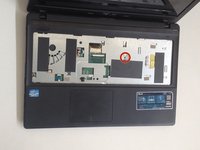
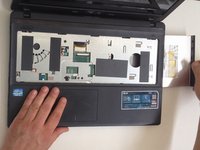
    1. Asus X55C Optical Drive Replacement, Optical Drive: step 3, image 1 of 2 Asus X55C Optical Drive Replacement, Optical Drive: step 3, image 2 of 2
      • Remove the screw.

      • Pull out the SATA DVD Drive.

      Ask FixBot

      Add Comment

Conclusion

To reassemble your device, follow these instructions in reverse order.

Cancel: I did not complete this guide.

3 other people completed this guide.

ZFix

Member since: 12/09/13

197,480 Reputation

330 Guides authored

Team

Master Techs Member of Master Techs

Community

334 Members

7,106 Guides authored

3 Guide Comments

Thanks, it is very handy!

Ramakrishnan - Reply Share

Easy - thanks

Joe Mazur - Reply Share

Thank you! Very well explained and simple.

jbrook - Reply Share

Add Comment

View Statistics:

Past 24 Hours: 1

Past 7 Days: 13

Past 30 Days: 45

All Time: 5,825