
Asus X553MA-BPD07051 Battery Replacement

Stephanie DeCarvalho and 4 other contributors
Last updated on Feb 16, 2026
Views: 3.5K
View statistics:
- Past 24 Hours:
- 1
- Past 7 Days:
- 13
- Past 30 Days:
- 77
- All Time:
- 3,485
Comments: 3
1 comment on steps, 2 guide comments.
Go to guide commentsCompleted: 7 8
7 people have marked this guide "completed." Will you be next?
8 people have marked this guide "completed." Including you — great job!
Favorites: 1 2
1 person has favorited (and subscribed to) this guide. Will you be next?
2 people have favorited (and subscribed to) this guide — including you!
Featured Student Guide
This guide has been the hard work of our awesome students and is found to be exceptionally cool by the iFixit staff.
Introduction
Go to step 1 ↓If you are having issues with your AsusX553MA-BPD07051 holding a charge, and you have identified that the issue is not the power cord adapter, the problem is most likely with the battery itself. Once you have identified that your battery does not function properly and needs to be replaced, this guide will allow for simple removal of the battery. Ensure that before working on your laptop, the laptop is completely turned off. For more troubleshooting assistance, check out this link. Before opening up the laptop, ensure that the device has been powered off to avoid being shocked.
What you need
Tools


Video Overview
-
-
-
Use a Phillips #0 screwdriver (PH0 bit) to remove the four 5.0 mm screws that are securing the bottom of the laptop.
-
Use a Phillips #0 screwdriver (PH0 bit) to remove the six 11.0 mm screws that are securing the bottom of the laptop.
 Ask FixBot
-
-
-
Lift the edges of the keyboard using the plastic iFixit opening tool and raise the keyboard slightly to see the inside of the laptop.
-
-
-
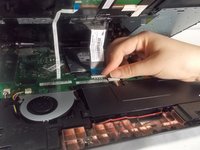
Lift back the clip on the ribbon tape, and pull the tape out in order to remove the keyboard from the laptop.
-
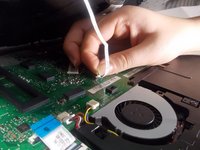
Remove both pieces of the ribbon tape connecting the keyboard to the motherboard.
-
-
-
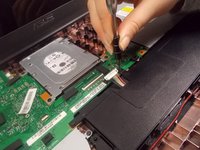
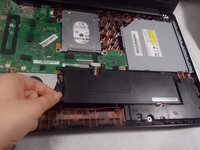
Remove the bundled cable connector attaching the battery to the motherboard with the plastic iFixit opening tool.
-
-
-
-
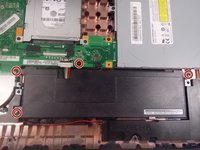
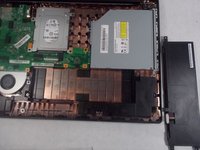
Use Phillips #0 screwdriver (PH0 bit) to remove the four 6.0 mm screws attaching the battery to the laptop.
-
-






To reassemble your device, follow these instructions in reverse order.
Cancel: I did not complete this guide.
7 other people completed this guide.

Team

UMass Dartmouth, Team S1-G4, Botvin Fall 2019 Member of UMass Dartmouth, Team S1-G4, Botvin Fall 2019
UMASSD-BOTVIN-F19S1G4
3 Members
60 Guides authored
