
Asus X551CA Power Button Replacement

Josh and
Last updated on Jun 3, 2014
Views: 14K
View statistics:
- Past 24 Hours:
- 4
- Past 7 Days:
- 28
- Past 30 Days:
- 123
- All Time:
- 13,779
Comments: 11
10 comments on steps, 1 guide comment.
Go to guide commentsCompleted: 7 8
7 people have marked this guide "completed." Will you be next?
8 people have marked this guide "completed." Including you — great job!
Favorites: 3 4
3 people have favorited (and subscribed to) this guide. Will you be next?
4 people have favorited (and subscribed to) this guide — including you!
What you need
Tools


Introduction
Go to step 1 ↓The Asus X551CA power button allows the laptop to turn on and off. If it is broken, the laptop will not receive the signal to boot up.
-
-
-
Turn the laptop upside-down and remove the following screws using a Phillips #0 driver:
-
Two 9.5 mm screws in the middle of the back edge, and one 9.5 mm screw in the right edge
-
Two 4.3 mm screws in the back corners
-
One 17.5 mm screw at the left edge near the optical drive
-
Three 4.3 mm screws in the front edge
 Ask FixBot
-
-
-
Use the plastic opening tool to separate the keyboard plate cover from the bottom cover. In order to do this, insert the plastic opening tool in between the keyboard plate cover and the bottom cover, then slide along edges to pry open.
-
-
-
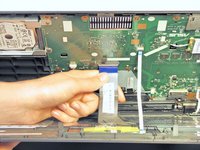
Locate the three ribbons connecting the keyboard plate cover to the bottom cover.
-
-
-
-
Invert the laptop in order to gain access to the ribbons.
-
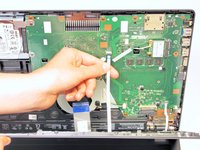
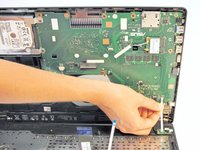
Remove each ribbon by flipping the small white plastic flap up and gently pulling on the ribbon.
-
-
-
Now that the ribbons have been detached from the bottom cover, carefully remove the keyboard plate cover. Once it has been removed, place it in a safe and moisture free area so it does not get damaged.
-
-
-
-
-
Locate the power button in the corner of the keyboard plate cover.
-
Disconnect the ribbon from the small green board by flipping up the small white flap and pulling parallel to the green board's surface.
-
-
-
Remove the two 3.2 mm Phillips #0 screws on the power button using the Phillips #0 Screwdriver.
-
-
-
Remove the power button assembly by firmly grasping it from both sides and lifting it off of the keyboard plate cover.
-
-




To reassemble your device, follow these instructions in reverse order.
Cancel: I did not complete this guide.
7 other people completed this guide.

Team

Cal Poly, Team 7-22, Regan Spring 2014 Member of Cal Poly, Team 7-22, Regan Spring 2014
CPSU-REGAN-S14S7G22
5 Members
180 Guides authored
