Up to 20% off select tools
Free Shipping on Domestic Orders $75+

Asus X54C HDD, RAM Memory Replacement

Views: 13K

View statistics:

Past 24 Hours:
4
Past 7 Days:
25
Past 30 Days:
123
All Time:
13,447
Comments: 6

1 comment on steps, 5 guide comments.

Go to guide comments
Completed: 7

7 people have marked this guide "completed." Will you be next?

Favorites: 0

No one has favorited (and subscribed to) this guide. Will you be the first?

Time Required: 10 - 15 minutes
Difficulty: Easy
Community-Contributed Guide

An awesome member of our community made this guide. It was not created by iFixit staff.

Asus X54C HDD, RAM Memory Replacement

What you need

Tools

Introduction

Go to step 1 ↓

ASUS X54C, X54H, X54L, X54HR - how to replace or upgrade HDD, RAM memory, Wi-Fi module.


Video Overview

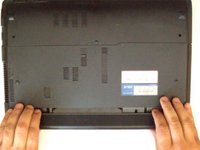
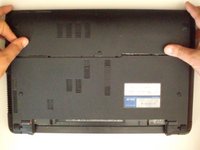
    1. Asus X54C HDD, RAM Memory Replacement, Battery: step 1, image 1 of 2 Asus X54C HDD, RAM Memory Replacement, Battery: step 1, image 2 of 2
      • Disconnect the charger and switch off the laptop.

      • Two keys keep locked battery.

      Ask FixBot

      Add Comment

    1. Asus X54C HDD, RAM Memory Replacement, HDD COVER: step 2, image 1 of 2 Asus X54C HDD, RAM Memory Replacement, HDD COVER: step 2, image 2 of 2
      • Remove the two Phillips screws.

      • Remove the HDD cover.

      Ask FixBot

      Add Comment

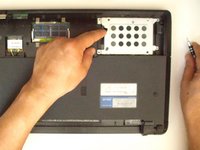
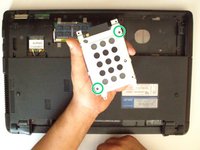
    2. Asus X54C HDD, RAM Memory Replacement: step 3, image 1 of 3 Asus X54C HDD, RAM Memory Replacement: step 3, image 2 of 3 Asus X54C HDD, RAM Memory Replacement: step 3, image 3 of 3
      • The HDD caddy iz secured by three Phillips screws. Remove them.

      • Use the black tape near to the SATA connector to slide and remove the HDD.

      • To remove the hard disk from the HDD caddy, unscrew the 2x Phillips screw.

      Ask FixBot

      Add Comment

    3. Asus X54C HDD, RAM Memory Replacement: step 4, image 1 of 3 Asus X54C HDD, RAM Memory Replacement: step 4, image 2 of 3 Asus X54C HDD, RAM Memory Replacement: step 4, image 3 of 3
      • There is one expansion slot for a memory module:

      • SO DIMM 204-pin, DDR3 SDRAM, 1333 MHz

      • Under the HDD cover is also the Wi-Fi card.

      Ask FixBot

      Add Comment

Conclusion

To reassemble your device, follow these instructions in reverse order.

Cancel: I did not complete this guide.

7 other people completed this guide.

Author

with

ZFix

Member since: 12/09/13

197,930 Reputation

330 Guides authored

Team

Master Techs Member of Master Techs

Community

337 Members

8,294 Guides authored

5 Guide Comments

Bonjour,

Le Portable ASSUS X54C peut-il supporter 8Go de RAM alors qu’au départ, il en a 4 Go ?

merci pour le tuto.

CR (rousselclaude0995@orange.fr)

claude ROUSSEL - Reply Share

Bonjour, oui il peut aller jusqu'à 8Go maximum.

Brendan - Reply Share

bonjour, un asus x54h peut il supporter 8go de ram ?

merci

mysoundsyourears - Reply Share

Bonjour,

Oui il peut supporter 8 Go de RAM maximum.

Brendan - Reply Share

I have a black screen. The fan is working, the caplock not working

Jurisprudence Kennelly - Reply Share

Add Comment

View Statistics:

Past 24 Hours: 4

Past 7 Days: 25

Past 30 Days: 123

All Time: 13,447