Free Shipping on Domestic Orders $75+

Asus X515 SSD Replacement

    1. Asus X515 SSD Replacement, Flip over laptop: step 1, image 1 of 2 Asus X515 SSD Replacement, Flip over laptop: step 1, image 2 of 2
      • Power down the laptop and unplug all of the cables.

      • Flip over the laptop.

      Ask FixBot

      Add Comment

    2. Asus X515 SSD Replacement, Take off bottom cover: step 2, image 1 of 2 Asus X515 SSD Replacement, Take off bottom cover: step 2, image 2 of 2
      • Remove the 10 phillips screws from the bottom of the case.

      • Using a prying tool pry the bottom of the case open.

      Ask FixBot

      Add Comment

    3. Asus X515 SSD Replacement, Disconnect battery: step 3, image 1 of 3 Asus X515 SSD Replacement, Disconnect battery: step 3, image 2 of 3 Asus X515 SSD Replacement, Disconnect battery: step 3, image 3 of 3
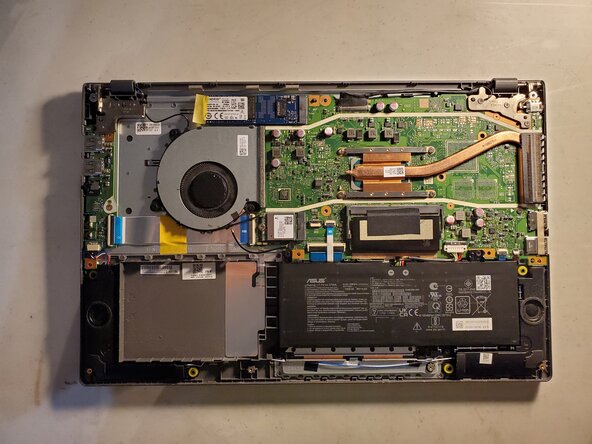
      • Locate the battery and its connector.

      • Using your fingers or a prying tool pull up on the connector to disconnect it.

      Ask FixBot

      Add Comment

    4. Asus X515 SSD Replacement, Remove the SSD: step 4, image 1 of 3 Asus X515 SSD Replacement, Remove the SSD: step 4, image 2 of 3 Asus X515 SSD Replacement, Remove the SSD: step 4, image 3 of 3
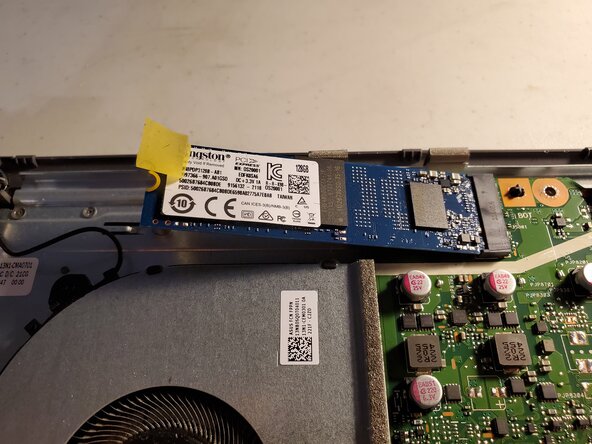
      • Locate the SSD

      • Peel the tape so that you can access the screw.

      • Remove the single screw.

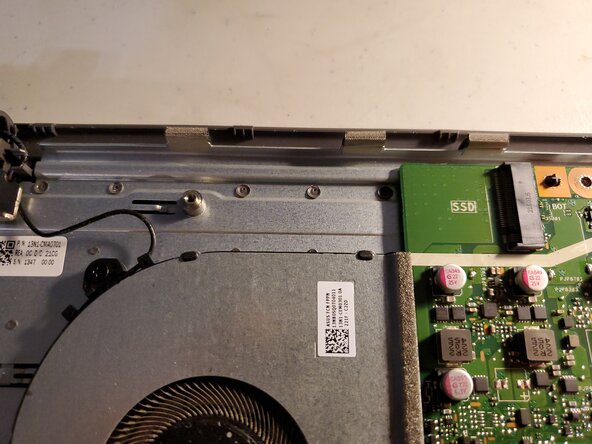
      • The SSD will pop up and face outwards.

      • Pull the SSD outwards.

      Ask FixBot

      Add Comment

Conclusion

To reassemble your device, follow these instructions in reverse order.

Cancel: I did not complete this guide.

Jeremiah C.

Member since: 03/28/22

847 Reputation

6 Guides authored

0 Guide Comments

Add Comment

View Statistics:

Past 24 Hours: 3

Past 7 Days: 40

Past 30 Days: 181

All Time: 1,735