Free Shipping on Domestic Orders $75+

Asus X501A-RH31 Battery Replacement

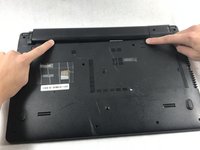
    1. Asus X501A-RH31 Battery Replacement, Battery: step 1, image 1 of 1
      • Turn the laptop over so that the back is facing upwards.

      Ask FixBot

      Add Comment

    2. Asus X501A-RH31 Battery Replacement: step 2, image 1 of 1
      • To unlock the left tab, make sure the tab on the left has red showing.

      Ask FixBot

      Add Comment

    3. Asus X501A-RH31 Battery Replacement: step 3, image 1 of 2 Asus X501A-RH31 Battery Replacement: step 3, image 2 of 2
      • To unlock the right tab, push the right slider to the left with one hand.

      • Push the battery out with the other hand.

      Ask FixBot

      Add Comment

Conclusion

To reassemble your device, follow these instructions in reverse order.

Cancel: I did not complete this guide.

Romana Hruby

Member since: 10/20/17

596 Reputation

5 Guides authored

Team

0 Guide Comments

Add Comment

View Statistics:

Past 24 Hours: 4

Past 7 Days: 25

Past 30 Days: 105

All Time: 1,060