Free Shipping on Domestic Orders $75+

Asus VivoTab Note 8 IO Board Replacement

What you need

  1. Asus VivoTab Note 8 IO Board Replacement, Back Panel: step 1, image 1 of 1
    • Remove the pen and memory card if you have them; they may get in the way when you are opening the device.

    • Pry open the edges of the cover using the plastic opening tool. The memory card slot is very useful for getting started.

    Ask FixBot

    Add Comment

  2. Asus VivoTab Note 8 IO Board Replacement: step 2, image 1 of 2 Asus VivoTab Note 8 IO Board Replacement: step 2, image 2 of 2
    • Move the opening tool along the edges of the tablet and push up wherever you can. You may need to open up all of the sides to take the panel off.

    • Pull apart the sides of the casing by hand.

    Ask FixBot

    Add Comment

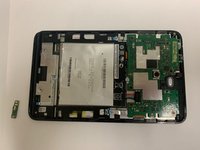
  3. Asus VivoTab Note 8 IO Board Replacement: step 3, image 1 of 1
    • After pulling the panel off, put it to the side.

    Ask FixBot

    Add Comment

  4. Asus VivoTab Note 8 IO Board Replacement, IO Board: step 4, image 1 of 1
    • After removing the back panel, you will see the IO Board under another removable plastic piece.

    Ask FixBot

    Add Comment

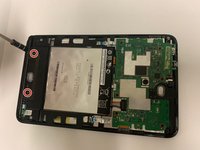
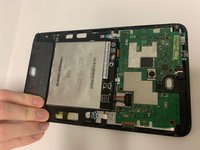
  5. Asus VivoTab Note 8 IO Board Replacement: step 5, image 1 of 2 Asus VivoTab Note 8 IO Board Replacement: step 5, image 2 of 2
    • Unscrew the two screws of the plastic piece, and lift it off.

    Ask FixBot

    Add Comment

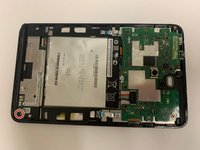
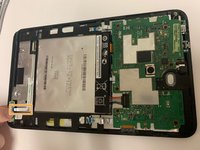
  6. Asus VivoTab Note 8 IO Board Replacement: step 6, image 1 of 3 Asus VivoTab Note 8 IO Board Replacement: step 6, image 2 of 3 Asus VivoTab Note 8 IO Board Replacement: step 6, image 3 of 3
    • Unscrew the screw holding down the IO Board.

    • Pull out the ribbon (hold the ribbon with one hand and the board with the other, then pull) and remove the IO Board.

    Ask FixBot

    Add Comment

Conclusion

To reassemble your device, follow these instructions in reverse order.

Cancel: I did not complete this guide.

Ryan Spencer

Member since: 09/21/18

756 Reputation

6 Guides authored

0 Guide Comments

Add Comment

View Statistics:

Past 24 Hours: 0

Past 7 Days: 6

Past 30 Days: 18

All Time: 840