
Asus VivoBook S14 Screen Replacement

Alexis Harper and 2 other contributors
Last updated on May 12, 2026
Views: 754
View statistics:
- Past 24 Hours:
- 4
- Past 7 Days:
- 44
- Past 30 Days:
- 196
- All Time:
- 754
Comments: 1
1 comment on steps.
Completed: 0 1
No one has marked this guide "completed." Will you be the first?
1 person has marked this guide "completed." It's you — great job!
Favorites: 0 1
No one has favorited (and subscribed to) this guide. Will you be the first?
1 person has favorited (and subscribed to) this guide — and that's you!
Introduction
Go to step 1 ↓You may need to replace your display if it is physically cracked, has dead pixels or permanent lines, exhibits unfixable flickering, or if you want to upgrade your resolution and refresh rate. This guide will walk you through safely installing a display replacement.
Please ensure the laptop is turned off before beginning.
What you need
Tools


-
-
-
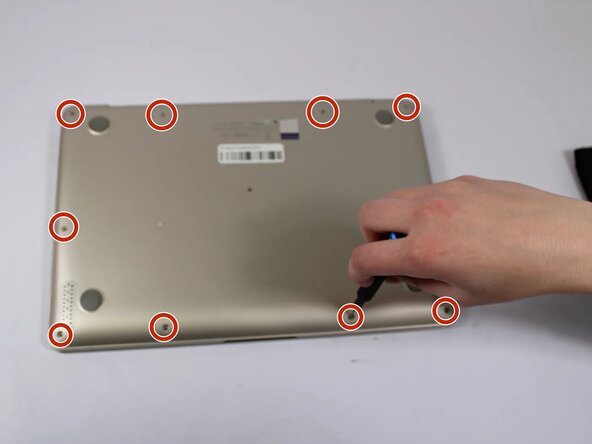
Remove all eleven 5 mm screws on the back panel with a Phillips #0 screwdriver.
-
Insert an iFixit opening tool between the back panel and the chassis. Carefully pry around the edges until the plastic clips release.
-
Lift the back panel off the laptop.
 Ask FixBot
-
-
-
-
-
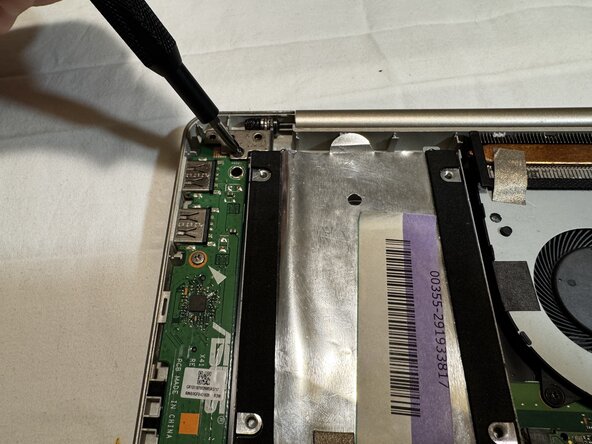
Using a Phillips screwdriver to remove the screws securing each of the two hinges.
-
-
-
To disconnect the display cable from the motherboard, flip up the small metal locking bail using your opening tool or fingernail.
-
Then gently slide the connector horizontally out of its socket by pulling the clear plastic tab.
-
-
-
Separate the upper case (keyboard/palm rest assembly) from the lower chassis frame.
-
-
-
With the iFixit opening tool, place the tool's flat edge into the seam where the cover meets the laptop chassis.
-
Gently twist the tool or use a side-to-side wiggling motion to release the internal plastic clips.
-
Once a gap is created, apply a gentle upward or outward force to "pop" the hinge cover off, working your way along the length of the hinge from one side to the other.
-
-
-
Use a Phillips screwdriver to remove the two screws securing the bezel to display assembly.
-
-
-
-
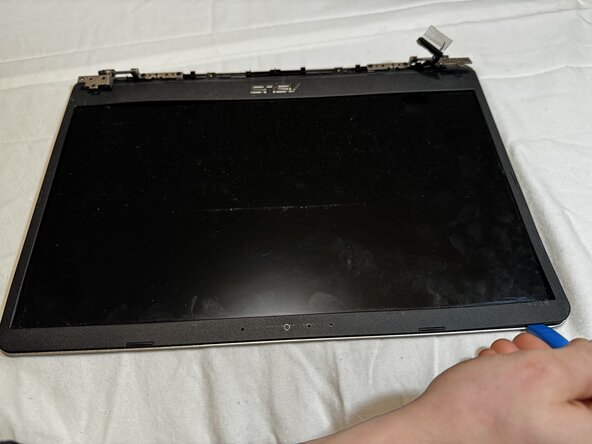
To separate the bezel, insert the opening tool into the seam between the screen and the frame.
-
Slide the opening tool along the perimeter while applying a gentle twisting motion to pop the internal plastic clips.
-
-
-
Using a Phillips screwdriver to remove the mounting screws securing the metal hinges to the display chassis.
-
Firmly grasp the sides of the display and slide the panel upward or outward to clear the hinge pins from their alignment slots.
-







To reassemble your device, follow the above steps in reverse order.
Take your e-waste to an R2 or e-Stewards certified recycler.
Repair didn’t go as planned? Try some basic troubleshooting or ask our Answers community for help.
Team

UW Tacoma, Team E-3, Rose Winter 2026 Member of UW Tacoma, Team E-3, Rose Winter 2026
UWT-ROSE-W26SEG3
4 Members
48 Guides authored
