
Asus VivoBook S14 RAM Replacement

Alexis Harper and 3 other contributors
Last updated on May 12, 2026
Views: 419
View statistics:
- Past 24 Hours:
- 4
- Past 7 Days:
- 24
- Past 30 Days:
- 127
- All Time:
- 419
Comments: 1
1 comment on steps.
Completed: 0 1
No one has marked this guide "completed." Will you be the first?
1 person has marked this guide "completed." It's you — great job!
Favorites: 0 1
No one has favorited (and subscribed to) this guide. Will you be the first?
1 person has favorited (and subscribed to) this guide — and that's you!
Introduction
Go to step 1 ↓The RAM in the Asus VivoBook S14 allows the laptop to run programs and multitask efficiently. If your laptop is running slowly, freezing frequently, or you are upgrading for better performance, replacing or upgrading the RAM may resolve the issue. This guide walks you through removing the back panel, safely accessing the RAM module, and installing a replacement.
Please ensure the laptop is turned off before beginning.
What you need
Tools


-
-
-
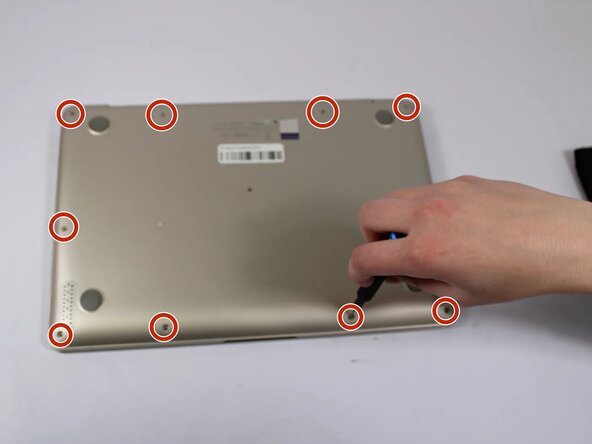
Remove all eleven 5 mm screws on the back panel with a Phillips #0 screwdriver.
-
Insert an iFixit opening tool between the back panel and the chassis. Carefully pry around the edges until the plastic clips release.
-
Lift the back panel off the laptop.
 Ask FixBot
-
-
-
-
-
-
To the right side of the motherboard is the RAM module. It is secured by two small metal retaining clips on either side.
-
-
-
Two clips secure the RAM module in place, one on each side. Using your fingers, spread the clips away from the RAM module.
-
Remove the RAM module.
-



To reassemble your device, follow the above steps in reverse order.
Take your e-waste to an R2 or e-Stewards certified recycler.
Repair didn’t go as planned? Try some basic troubleshooting or ask our Answers community for help.
Team

UW Tacoma, Team E-3, Rose Winter 2026 Member of UW Tacoma, Team E-3, Rose Winter 2026
UWT-ROSE-W26SEG3
4 Members
48 Guides authored
