
Asus VivoBook S14 Back Panel Replacement

Kristen Gismondi and one other contributor
Last updated on May 12, 2026
Views: 775
View statistics:
- Past 24 Hours:
- 6
- Past 7 Days:
- 27
- Past 30 Days:
- 102
- All Time:
- 775
Comments: 1
1 comment on steps.
Completed: 1 2
1 person has marked this guide "completed." Will you be next?
2 people have marked this guide "completed." Including you — great job!
Favorites: 0 1
No one has favorited (and subscribed to) this guide. Will you be the first?
1 person has favorited (and subscribed to) this guide — and that's you!
What you need
Tools


-
-
-
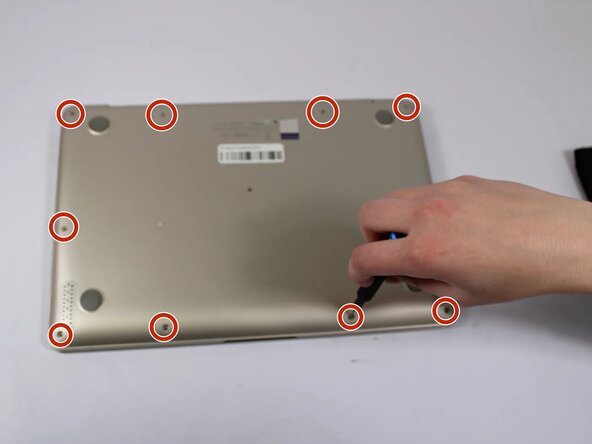
Remove all eleven 5 mm screws on the back panel with a Phillips #0 screwdriver.
-
Insert an iFixit opening tool between the back panel and the chassis. Carefully pry around the edges until the plastic clips release.
-
Lift the back panel off the laptop.
 Ask FixBot
-
-
-



To reassemble your device, follow these instructions in reverse order.
Cancel: I did not complete this guide.
One other person completed this guide.

