Introduction
This guide shows how to upgrade or replace the RAM in an ASUS Vivobook M1515D laptop. Increasing RAM can improve system performance and fix issues such as slow performance, freezing, or system crashes. This repair involves removing the bottom panel of the laptop to access the RAM slot.
What you need
-
-
-
Ensure the device is powered off and unplug the charger and disconnect any peripherals
 Ask FixBot
-
-
-
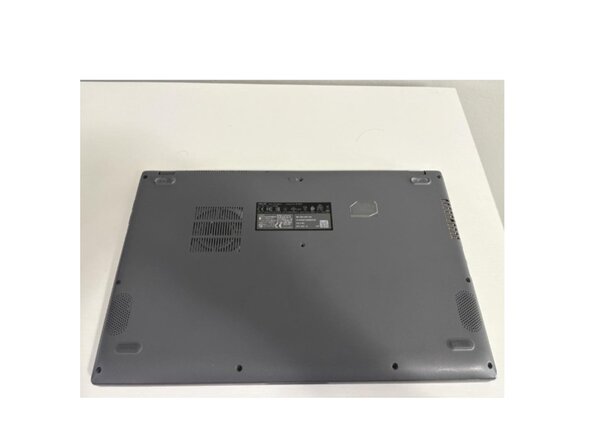
Remove the 10 visible screws at the bottom of the laptop using a Phillips #0 screwdriver
-
-
-
-
Using a plastic pry tool or guitar pick pry the bottom cover away from the body of the laptop.
-
-
-
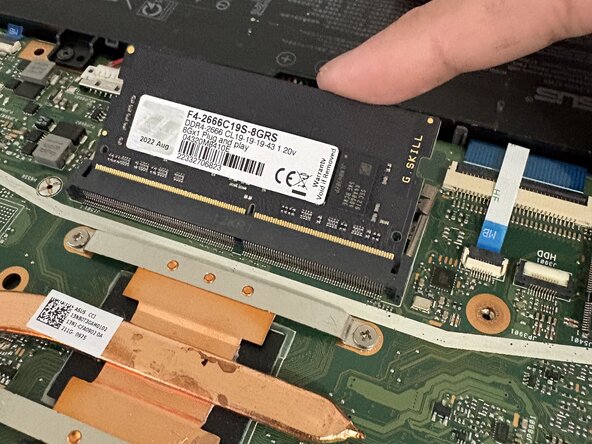
The RAM module will pop out at an angle. Carefully slide the module out of its socket.
-
-





To reassemble your device, follow the above steps in reverse order.
Take your e-waste to an R2 or e-Stewards certified recycler.
Repair didn’t go as planned? Try some basic troubleshooting or ask our Answers community for help.
Cancel: I did not complete this guide.
One other person completed this guide.

Team

York University, Team M-3, Woodhouse Winter 2026 Member of York University, Team M-3, Woodhouse Winter 2026
YORK-WOODHOUSE-W26SMG3
7 Members
36 Guides authored
