Free Shipping on Domestic Orders $75+

Asus VivoBook 14" F412DA Cooling Fan Replacement

What you need

    1. Asus VivoBook 14" F412DA Cooling Fan Replacement, Cooling Fan: step 1, image 1 of 1
      • Open up by removing (4) 9mm screws on the top row and center.

      • Remove (2) 8mm screws on the 2 middle outside screws.

      • Remove (4) 6mm screws on the bottom half.

      Ask FixBot

      Add Comment

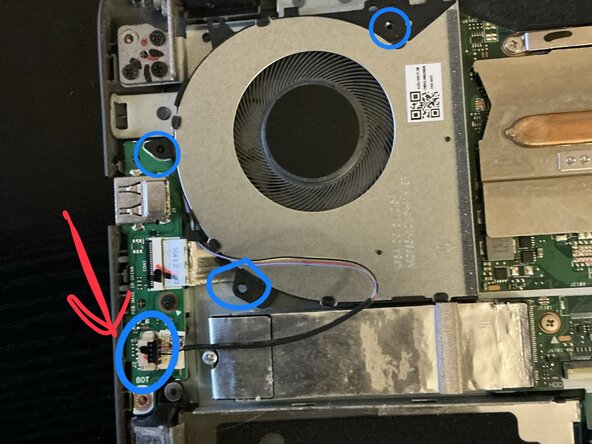
    2. Asus VivoBook 14" F412DA Cooling Fan Replacement, Fan Removal: step 2, image 1 of 1
      • Remove those 3 screws as circled and unplug connector.

      Ask FixBot

      Add Comment

    3. Asus VivoBook 14" F412DA Cooling Fan Replacement, Fan Instal: step 3, image 1 of 1
      • Reconnect connector

      • Screw back in the 3 screws.

      Ask FixBot

      Add Comment

    4. Asus VivoBook 14" F412DA Cooling Fan Replacement: step 4, image 1 of 1
      • Close back up

      Ask FixBot

      Add Comment

Conclusion

To reassemble your device, follow these instructions in reverse order.

Cancel: I did not complete this guide.

Mario Gutierrez

Member since: 02/24/26

109 Reputation

1 Guide authored

0 Guide Comments

Add Comment

View Statistics:

Past 24 Hours: 4

Past 7 Days: 9

Past 30 Days: 37

All Time: 68