Free Shipping on Domestic Orders $75+

Asus Transformer Book T100TAF Motherboard Replacement

What you need

  1. Asus Transformer Book T100TAF Motherboard Replacement, Motherboard: step 1, image 1 of 1
    • Detach the screen from the keyboard using the silver button and pulling the screen in the upwards direction.

    Ask FixBot

    Add Comment

  2. Asus Transformer Book T100TAF Motherboard Replacement: step 2, image 1 of 1
    • Pry the plastic backing off of the tablet using the plastic spudger, releasing all interior clips.

    Ask FixBot

    Add Comment

  3. Asus Transformer Book T100TAF Motherboard Replacement: step 3, image 1 of 1
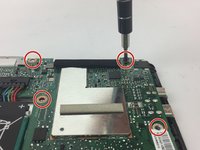
    • Unscrew all the silver screws from the motherboard

    • 3.0 mm (3) silver phillips head

    Ask FixBot

    Add Comment

  4. Asus Transformer Book T100TAF Motherboard Replacement: step 4, image 1 of 2 Asus Transformer Book T100TAF Motherboard Replacement: step 4, image 2 of 2
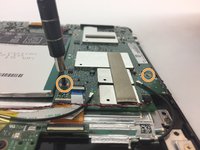
    • Unscrew all the black screws from the motherboard with a PH00 screwdriver

    • 4.5 mm (4) black phillips head

    • 4.5 mm (2) black phillips head

    Ask FixBot

    Add Comment

  5. Asus Transformer Book T100TAF Motherboard Replacement: step 5, image 1 of 1
    Tool used on this step:
    Tweezers
    $3.99
    Buy
    • Detach the battery cable by steadily pulling it away from the motherboard with angled tweezers.

    Ask FixBot

    Add Comment

  6. Asus Transformer Book T100TAF Motherboard Replacement: step 6, image 1 of 1
    • Gently pry the orange ribbon cable that is near the battery cable upwards with tweezers.

    Ask FixBot

    Add Comment

  7. Asus Transformer Book T100TAF Motherboard Replacement: step 7, image 1 of 1
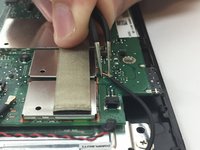
    • Remove the black strip along the top edge, releasing the two sets of connections.

    • Adhesive may hold this strip to the motherboard.

    Ask FixBot

    Add Comment

  8. Asus Transformer Book T100TAF Motherboard Replacement: step 8, image 1 of 1
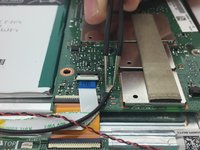
    • Use tweezers to detach the black and red twisted pair cable from its connection to the motherboard.

    Ask FixBot

    Add Comment

  9. Asus Transformer Book T100TAF Motherboard Replacement: step 9, image 1 of 2 Asus Transformer Book T100TAF Motherboard Replacement: step 9, image 2 of 2
    • Detach the two thin black wires by grabbing them with tweezers.

    Ask FixBot

    Add Comment

  10. Asus Transformer Book T100TAF Motherboard Replacement: step 10, image 1 of 1
    • With tweezers, gently flip the white clip up that is holding the white ribbon cable down. Pull the base of the white ribbon cable away from the motherboard with tweezers.

    Ask FixBot

    Add Comment

  11. Asus Transformer Book T100TAF Motherboard Replacement: step 11, image 1 of 1
    • Disconnect the bottom orange ribbon cable with tweezers by pulling it away from the edge of the device.

    Ask FixBot

    Add Comment

  12. Asus Transformer Book T100TAF Motherboard Replacement: step 12, image 1 of 1
    • Verify that cables are no longer attached to the motherboard.

    Ask FixBot

    Add Comment

  13. Asus Transformer Book T100TAF Motherboard Replacement: step 13, image 1 of 2 Asus Transformer Book T100TAF Motherboard Replacement: step 13, image 2 of 2
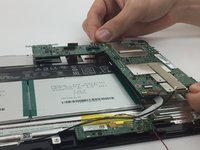
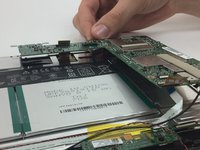
    • Grab the motherboard with two hands, and gently lift it out of the device.

    Ask FixBot

    Add Comment

Conclusion

To reassemble your device, follow these instructions in reverse order.

Cancel: I did not complete this guide.

4 other people completed this guide.

Danielle Nendza

Member since: 10/03/16

209 Reputation

1 Guide authored

Team

USF Tampa, Team 4-3, Passmore Fall 2016 Member of USF Tampa, Team 4-3, Passmore Fall 2016

USFT-PASSMORE-F16S4G3

4 Members

10 Guides authored

0 Guide Comments

Add Comment

View Statistics:

Past 24 Hours: 1

Past 7 Days: 5

Past 30 Days: 28

All Time: 3,436