
Asus ROG Strix GL553VD Battery Replacement

Mahmoud Mehdi and 2 other contributors
Last updated on Jul 27, 2023
Views: 6.6K
View statistics:
- Past 24 Hours:
- 4
- Past 7 Days:
- 30
- Past 30 Days:
- 140
- All Time:
- 6,635
Comments: 3
1 comment on steps, 2 guide comments.
Go to guide commentsCompleted: 5 6
5 people have marked this guide "completed." Will you be next?
6 people have marked this guide "completed." Including you — great job!
Favorites: 1 2
1 person has favorited (and subscribed to) this guide. Will you be next?
2 people have favorited (and subscribed to) this guide — including you!
Introduction
Go to step 1 ↓This is a simple guide on how to replace the battery in your Asus ROG Strix GL553VD gaming laptop.
Lithium batteries such as the one inside your gaming laptop deteriorate over time, losing their ability to hold a charge. This may not be a problem if you use your gaming laptop plugged in most of the time, but if you travel with your laptop and notice the laptop holding less charge and lasting for less time while on battery power, a battery replacement may restore some of the functionality of your laptop.
Happy fixing!
What you need

-
-
-
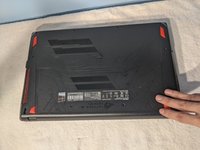
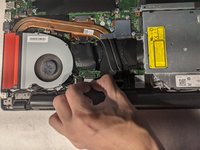
Use a JIS screwdriver to remove the ten 4 mm screws from the bottom cover.
 Ask FixBot
-
-
-
Open the flap in the middle to reveal the 11th screw and remove it using the same JIS screwdriver.
-
-
-


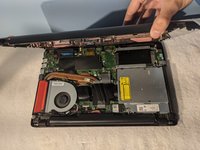
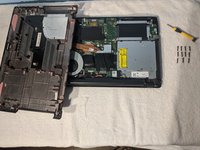


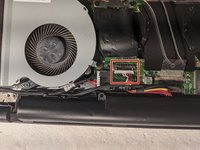
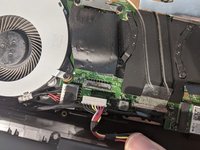

To reassemble your device, follow these instructions in reverse order.
Cancel: I did not complete this guide.
5 other people completed this guide.

Team

York University, Team S1-G89, Woodhouse Fall 2020 Member of York University, Team S1-G89, Woodhouse Fall 2020
YORK-WOODHOUSE-F20S1G89
1 Member
12 Guides authored
2 Guide Comments
Thank you for the guide. It was tricky to find the screw in the middle, hidden behind the flap. The screws are however not torx as shown.
Hi,
Great job... quick and easy !
I've changed the battery of my ASUS ROG GL553VD but there is a problem... the battery doesn't charge and it is noticed a charge level at 255% in windows o_O Do you know if another action is needed ?
Thanks :)
