
Asus ROG GL551J Hard Drive Replacement

Thien Vu and 2 other contributors
Last updated on Nov 16, 2022
Views: 5.3K
View statistics:
- Past 24 Hours:
- 4
- Past 7 Days:
- 35
- Past 30 Days:
- 121
- All Time:
- 5,340
Comments: 3
3 comments on steps.
Completed: 7 8
7 people have marked this guide "completed." Will you be next?
8 people have marked this guide "completed." Including you — great job!
Favorites: 1 2
1 person has favorited (and subscribed to) this guide. Will you be next?
2 people have favorited (and subscribed to) this guide — including you!
Missing Details
Some of this guide's details are missing. Help users by adding tools, difficulty, or time.
Introduction
Go to step 1 ↓Use this guide to remove replace the hard drive in your Asus ROG GL551J, which can be completed in fewer than 3 steps.
What you need
Fix Kit
This kit contains all the parts and tools needed to complete this guide.

Parts


Tools


-
-
-
-
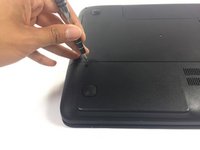
With laptop upside-down, locate and unscrew the two screws on the panel with the vents.
-
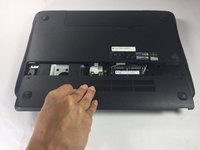
Slide the panel out and lift up to remove.
-
-
-
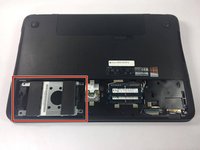
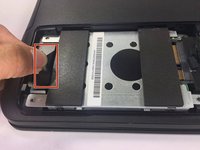
The hard drive is the metal rectangle with the two soft padding bars attached to it.
-
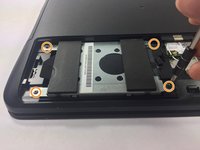
Locate and remove the 4 screws holding the hard drive down at each corner using a PH000 Philips head.
-
-
-
Locate the black plastic tab attached to the bottom of the hard drive and pull it straight outwards.
-
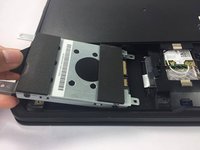
Once the hard drive detaches from the connector, lift the hard drive up and out.
-
-

 Ask FixBot






To reassemble your device, follow these instructions in reverse order.
Cancel: I did not complete this guide.
7 other people completed this guide.

Team

USF Tampa, Team 5-4, Lacy Spring 2017 Member of USF Tampa, Team 5-4, Lacy Spring 2017
USFT-LACY-S17S5G4
4 Members
60 Guides authored
