Free Shipping on Domestic Orders $75+

Asus ROG G751JL-DS71 CD-ROM Player Replacement

What you need

    1. Asus ROG G751JL-DS71 CD-ROM Player Replacement, CD-ROM Player: step 1, image 1 of 2 Asus ROG G751JL-DS71 CD-ROM Player Replacement, CD-ROM Player: step 1, image 2 of 2
      • Lift the rubber cover found on the bottom of the laptop.

      • Remove the 5.2 mm screw with a Phillips 1 Screwdriver.

      Ask FixBot

      Add Comment

    2. Asus ROG G751JL-DS71 CD-ROM Player Replacement: step 2, image 1 of 3 Asus ROG G751JL-DS71 CD-ROM Player Replacement: step 2, image 2 of 3 Asus ROG G751JL-DS71 CD-ROM Player Replacement: step 2, image 3 of 3
      • Use the nylon spudger to remove the back center panel.

      Ask FixBot

      Add Comment

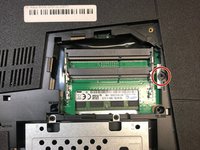
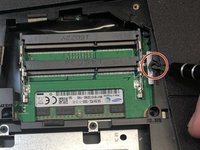
    3. Asus ROG G751JL-DS71 CD-ROM Player Replacement: step 3, image 1 of 2 Asus ROG G751JL-DS71 CD-ROM Player Replacement: step 3, image 2 of 2
      • Use a Phillips 1 Screwdriver to remove the 5 mm screw that is located underneath the back panel.

      Ask FixBot

      Add Comment

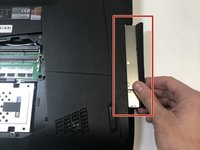
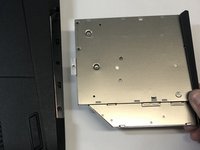
    4. Asus ROG G751JL-DS71 CD-ROM Player Replacement: step 4, image 1 of 2 Asus ROG G751JL-DS71 CD-ROM Player Replacement: step 4, image 2 of 2
      • Pull out the optical drive found on the side of the laptop.

      Ask FixBot

      Add Comment

Conclusion

To reassemble your device, follow these instructions in reverse order.

Cancel: I did not complete this guide.

One other person completed this guide.

Aurora Rios

Member since: 01/22/18

917 Reputation

4 Guides authored

Team

Cal Poly, Team S16-G1, Banghart Winter 2018 Member of Cal Poly, Team S16-G1, Banghart Winter 2018

CPSU-BANGHART-W18S16G1

4 Members

84 Guides authored

0 Guide Comments

Add Comment

View Statistics:

Past 24 Hours: 0

Past 7 Days: 6

Past 30 Days: 28

All Time: 948