Free Shipping on Domestic Orders $75+

Asus ROG G53SW-XT1 RAM Replacement

What you need

  1. Asus ROG G53SW-XT1 RAM Replacement, Battery: step 1, image 1 of 1
    • Unplug the power cable and flip the computer over.

    Ask FixBot

    Add Comment

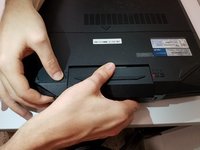
  2. Asus ROG G53SW-XT1 RAM Replacement: step 2, image 1 of 1
    • Unlock the battery by pushing the switch to the right.

    Ask FixBot

    Add Comment

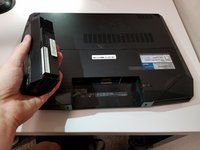
  3. Asus ROG G53SW-XT1 RAM Replacement: step 3, image 1 of 2 Asus ROG G53SW-XT1 RAM Replacement: step 3, image 2 of 2
    • Push and hold the left switch, then pull the battery out.

    Ask FixBot

    Add Comment

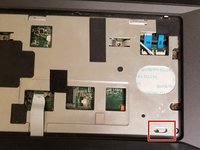
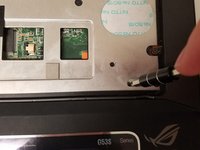
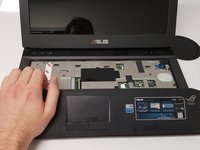
  4. Asus ROG G53SW-XT1 RAM Replacement, Back Panel: step 4, image 1 of 3 Asus ROG G53SW-XT1 RAM Replacement, Back Panel: step 4, image 2 of 3 Asus ROG G53SW-XT1 RAM Replacement, Back Panel: step 4, image 3 of 3
    • Insert your screwdriver into the locking mechanism and slide it to the left. This will unlock the hand rest and allow you to pull it free.

    Ask FixBot

    Add Comment

  5. Asus ROG G53SW-XT1 RAM Replacement: step 5, image 1 of 1
    • Remove the fourteen Phillips #0 screws.

    Ask FixBot

    Add Comment

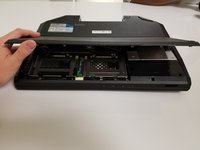
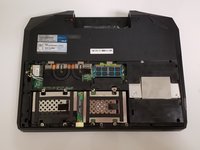
  6. Asus ROG G53SW-XT1 RAM Replacement: step 6, image 1 of 2 Asus ROG G53SW-XT1 RAM Replacement: step 6, image 2 of 2
    • Flip the laptop over and pull off the bottom cover.

    Ask FixBot

    Add Comment

  7. Asus ROG G53SW-XT1 RAM Replacement, RAM: step 7, image 1 of 1
    • Push the metal tabs at the side of the RAM away from one another.

    • The RAM should pop up.

    • Pull the RAM out.

    Ask FixBot

    Add Comment

Conclusion

To reassemble your device, follow these instructions in reverse order.

Cancel: I did not complete this guide.

One other person completed this guide.

sia

Member since: 02/21/18

145 Reputation

1 Guide authored

0 Guide Comments

Add Comment

View Statistics:

Past 24 Hours: 2

Past 7 Days: 5

Past 30 Days: 28

All Time: 849