Introduction
This guide is for replacing a broken of faulty keyboard.
What you need
-
-
-
Flip the laptop over so that the back panel is facing up.
-
Carefully remove the eight 5.7mm screws on the back panel using a Phillips #1 screwdriver.
 Ask FixBot
-
-
-
-
Turn the laptop upright and flip the screen open.
-
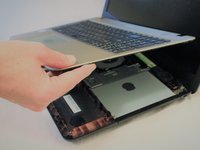
Using the plastic opening tool, gently pry the keyboard panel off of the base.
-
-
-
Gently raise the keyboard from the base enough to access the underside.
-
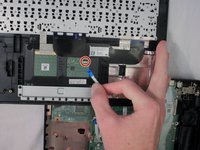
Gently pull up on the locking tab to release the ribbon cable. This should take no force to complete.
-
Remove the keyboard.
-
-


To reassemble your device, follow these instructions in reverse order.
Cancel: I did not complete this guide.
One other person completed this guide.

Team

Western Carolina University, Team S1-G4, Virtue Fall 2018 Member of Western Carolina University, Team S1-G4, Virtue Fall 2018
WCU-VIRTUE-F18S1G4
4 Members
60 Guides authored
