
Asus Q502LA-BSI5T14 RAM Replacement

Mary Kounelas and 3 other contributors
Last updated on Dec 23, 2017
Views: 1.1K
View statistics:
- Past 24 Hours:
- 2
- Past 7 Days:
- 16
- Past 30 Days:
- 87
- All Time:
- 1,101
Comments: 0
No one has left comments on this guide. Will you be first?
Go to guide commentsCompleted: 1 2
1 person has marked this guide "completed." Will you be next?
2 people have marked this guide "completed." Including you — great job!
Favorites: 0 1
No one has favorited (and subscribed to) this guide. Will you be the first?
1 person has favorited (and subscribed to) this guide — and that's you!
Introduction
Go to step 1 ↓The Random-Access Memory (RAM) is crucial to the speed and functionality of any laptop. If your laptop constantly freezes, reboots, or displays the Blue Screen of Death (BSOD), use this guide to help you replace or increase the RAM in your device.
What you need
Tools
-
Spudger4.9


-
-
-
Flip the laptop so the back panel is facing up.
-
Remove the ten 10 mm Phillips #1 screws securing the back panel.
 Ask FixBot
-
-
-
Carefully insert a plastic opening tool under one corner of the back panel.
-
Slide the tool along the seam to gently pry the panel up and away from the device.
-
-
-
-
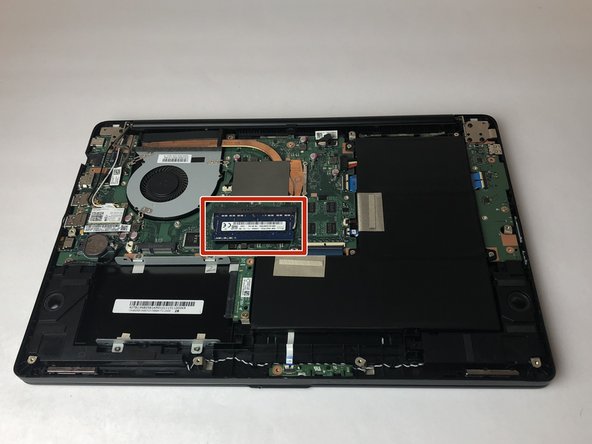
The RAM is the rectangular plate in the center.
-
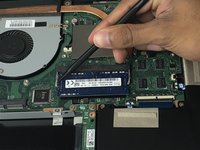
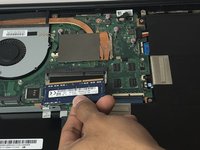
Use a spudger to press the clips securing the RAM outward. The RAM will pop up enabling you to lift it out.
-
-




To reassemble your device, follow these instructions in reverse order.
Cancel: I did not complete this guide.
One other person completed this guide.

Team

USF Tampa, Team S4-G1, Eyestone Fall 2017 Member of USF Tampa, Team S4-G1, Eyestone Fall 2017
USFT-EYESTONE-F17S4G1
4 Members
60 Guides authored
