Introduction
The overall purpose of having the back cover attached to the Asus Q200E-CT144H laptop is to protect what is stored within the laptop. If the back cover of your laptop is damaged, this can affect the components which are withheld inside the laptop. This can include the battery, fan, speaker, etc. The last thing you would want is for something to happen to the back cover, and if something has already happened to the back cover you can use this guide to assist you in replacing the back cover.
What you need
-
-
-
To start, turn off the laptop and disconnect the power cable.
-
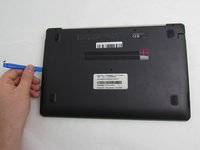
Flip the laptop over so the back panel is visible.
 Ask FixBot
-
-
-
-
Remove the 9 screws holding the cover in place by taking a Phillips #00 Screwdriver and turning it counterclockwise.
-
-
-
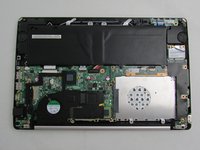
Use an iFixit opening tool to lift the back cover and remove it from the laptop.
-
-


To reassemble your device, follow these instructions in reverse order.

Team

Embry-Riddle Aeronautical University, Team S8-G2, Salas Fall 2019 Member of Embry-Riddle Aeronautical University, Team S8-G2, Salas Fall 2019
ERAU-SALAS-F19S8G2
3 Members
72 Guides authored
