Free Shipping on Domestic Orders $75+

Asus Padfone X Mini Camera Replacement

What you need

    1. Asus Padfone X Mini Camera Replacement, Speaker: step 1, image 1 of 1
      • With the phone facing down, look at the bottom right side corner and there should be a groove. Use a plastic opening tool and lift up to remove outside cover.

      • This is not the cover with the speaker attached.

      Ask FixBot

      Add Comment

    2. Asus Padfone X Mini Camera Replacement: step 2, image 1 of 1
      • Lift the battery out from the top of the device.

      Ask FixBot

      Add Comment

    3. Asus Padfone X Mini Camera Replacement: step 3, image 1 of 1
      • Around the perimeter, there should be 10 2 mm T5 Torx screws. Take them out.

      • Remove the cover.

      Ask FixBot

      Add Comment

    4. Asus Padfone X Mini Camera Replacement: step 4, image 1 of 1
      • Turn the cover over.

      • The speaker is attached to the inside of the cover and to the right of the camera hole.

      Ask FixBot

      Add Comment

    5. Asus Padfone X Mini Camera Replacement: step 5, image 1 of 1
      Tool used on this step:
      Tweezers
      $4.99
      Buy
      • Remove speaker with standard tweezers to minimize damage, and replace.

      Ask FixBot

      Add Comment

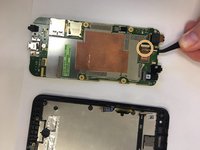
    1. Asus Padfone X Mini Camera Replacement, Screen: step 6, image 1 of 1
      • Detach the black connector on the left hand side of the motherboard.

      • Don't completely remove the black connector.

      Ask FixBot

      Add Comment

    2. Asus Padfone X Mini Camera Replacement: step 7, image 1 of 1
      • Disconnect silver connector from the motherboard. It is located on the left hand side above the black connector.

      Ask FixBot

      Add Comment

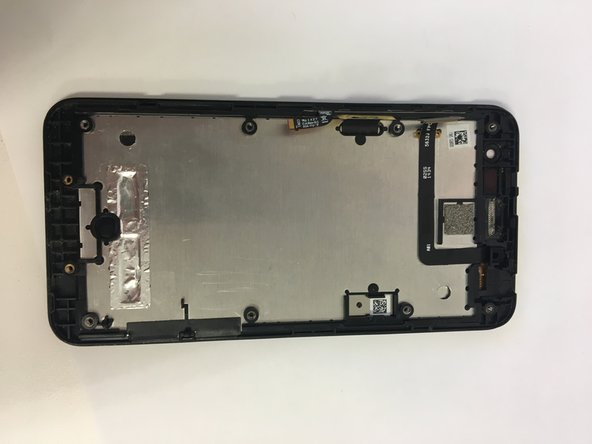
    3. Asus Padfone X Mini Camera Replacement: step 8, image 1 of 2 Asus Padfone X Mini Camera Replacement: step 8, image 2 of 2
      • Remove motherboard and replace screen.

      Ask FixBot

      Add Comment

    1. Asus Padfone X Mini Camera Replacement, Camera: step 9, image 1 of 1
      • Turn over the motherboard.

      Ask FixBot

      Add Comment

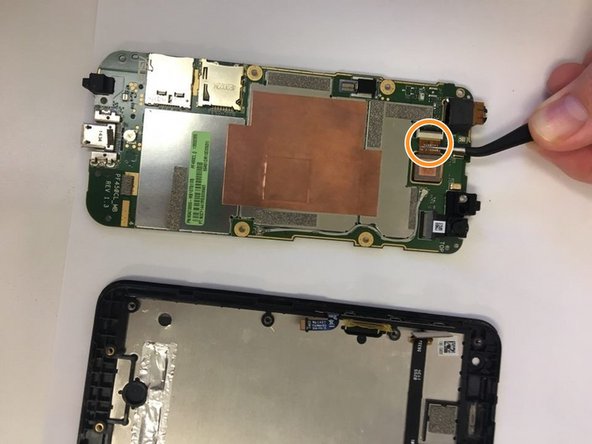
    2. Asus Padfone X Mini Camera Replacement: step 10, image 1 of 1
      Tool used on this step:
      Tweezers
      $4.99
      Buy
      • Using tweezers pull out the connector that connects the camera to the motherboard.

      Ask FixBot

      Add Comment

    3. Asus Padfone X Mini Camera Replacement: step 11, image 1 of 2 Asus Padfone X Mini Camera Replacement: step 11, image 2 of 2
      • Take out the camera.

      • Put in the new camera by sliding the camera connector into the receiver.

      Ask FixBot

      Add Comment

Conclusion

To reassemble your device, follow these instructions in reverse order.

Cancel: I did not complete this guide.

James Jackson

Member since: 09/18/18

97 Reputation

1 Guide authored

0 Guide Comments

Add Comment

View Statistics:

Past 24 Hours: 1

Past 7 Days: 3

Past 30 Days: 17

All Time: 532