Free Shipping on Domestic Orders $75+

Asus Memo Pad ME172V Battery Replacement

What you need

Video Overview

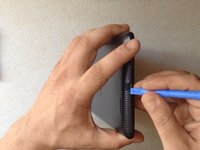
    1. Asus Memo Pad ME172V Battery Replacement, Battery: step 1, image 1 of 3 Asus Memo Pad ME172V Battery Replacement, Battery: step 1, image 2 of 3 Asus Memo Pad ME172V Battery Replacement, Battery: step 1, image 3 of 3
      • With plastic tools remove the back cover.

      • If you have a memory card inside - remove it first.

      Ask FixBot

      Add Comment

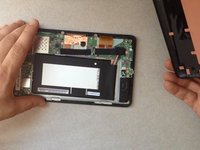
    2. Asus Memo Pad ME172V Battery Replacement: step 2, image 1 of 3 Asus Memo Pad ME172V Battery Replacement: step 2, image 2 of 3 Asus Memo Pad ME172V Battery Replacement: step 2, image 3 of 3
      • Disconnect the battery connector.

      • The battery is stuck to the LCD display frame with a double side adhesive tape.

      • With plastic tools separate the battery.

      Ask FixBot

      Add Comment

    3. Asus Memo Pad ME172V Battery Replacement: step 3, image 1 of 1
      Ask FixBot

      Add Comment

Conclusion

To reassemble your device, follow these instructions in reverse order.

Cancel: I did not complete this guide.

5 other people completed this guide.

ZFix

Member since: 12/09/13

197,504 Reputation

330 Guides authored

Team

Master Techs Member of Master Techs

Community

334 Members

7,366 Guides authored

2 Guide Comments

Hello, i want know if it is the same operation for asus memo pad 7 me572c ?

bechir77bejaoui - Reply Share

j'ai un probleme avec mon asus mémo pad 172v quand j'allume elle reste allumé le signe asus apparait avec le cercle de démarrage et elle reste comme ca elle ne s'ouvre pas est ce que probléme de batterie ,j'ai éssayé le flash mais meme problème

lord - Reply Share

Add Comment

View Statistics:

Past 24 Hours: 0

Past 7 Days: 6

Past 30 Days: 28

All Time: 15,426