
Asus L410MA-Ts02 Battery Replacement

Last updated on Jan 14, 2026
Views: 836
View statistics:
- Past 24 Hours:
- 5
- Past 7 Days:
- 19
- Past 30 Days:
- 87
- All Time:
- 836
Comments: 0
No one has left comments on this guide. Will you be first?
Go to guide commentsCompleted: 1 2
1 person has marked this guide "completed." Will you be next?
2 people have marked this guide "completed." Including you — great job!
Favorites: 0 1
No one has favorited (and subscribed to) this guide. Will you be the first?
1 person has favorited (and subscribed to) this guide — and that's you!
Introduction
Go to step 1 ↓This guide will walk you through how to replace the battery in the Asus L410MA-TS02 laptop.
There is minimal risk to removing the battery, but it is important to wear an ESD wrist strap when opening any electronic device. No special skills are required, so this is a very simple process to follow. The only risk is possible damage to the laptop if instructions are not followed correctly.
Battery replacement can be necessary when the battery is damaged, ineffective, or degraded due to age. Asus laptops in particular have many cases of batteries draining too quickly or turning off soon after being unplugged from a charger. If any of these apply, then replacing the battery may fix the issue.
What you need
Tools

-
-
-
Remove ten 6 mm screws that secure the lower case using a Phillips #1 screwdriver.
-
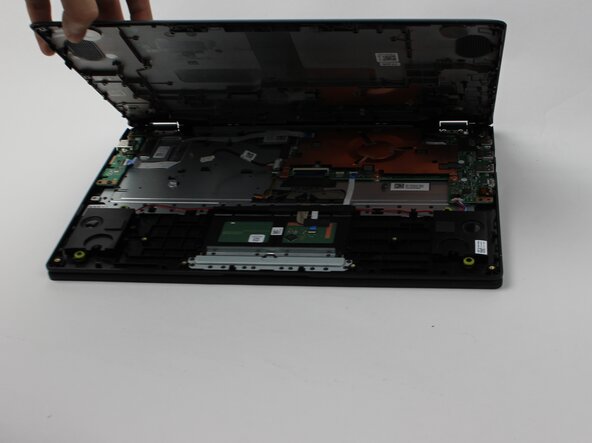
Carefully remove the lower case.
 Ask FixBot
-
-
-
-
-
Remove the 4 mm screws that are securing the battery using a Phillips #1 screwdriver.
-
-
-
Grip the white battery connecter found on its side and pull it directly out of its battery port.
-
-
-



To reassemble your device, follow these instructions in reverse order.
Cancel: I did not complete this guide.
One other person completed this guide.

Team

Sam Houston State, Team 7-1, Thornton Spring 2025 Member of Sam Houston State, Team 7-1, Thornton Spring 2025
SHSU-THORNTON-S25S7G1
3 Members
60 Guides authored
