Introduction
If your Asus K55VD has experienced sudden screen crashing, the blue screen of death, or abnormal noises within its system, then you must have a faulty hard drive. Before replacing the hard drive, make sure you save your data and completely turn the device off. Put each removed component into a safe location.
What you need
-
-
-
Use a Phillips #0 screwdriver to remove the two 1.5 mm screws in the smaller portion of the bottom cover.
-
After removing the screws, remove the smaller cover.
 Ask FixBot
-
-
-
-
Use a Phillips #0 screwdriver to remove the 1.5 mm screws that hold down the hard drive.
-
-


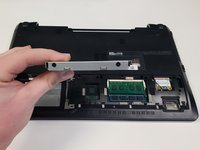
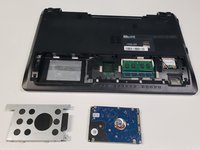
To reassemble your device, follow these instructions in reverse order.
Cancel: I did not complete this guide.
5 other people completed this guide.

Team

University of North Texas, Team S1-G4, Riccardelli Fall 2018 Member of University of North Texas, Team S1-G4, Riccardelli Fall 2018
UNT-RICCARDELLI-F18S1G4
4 Members
60 Guides authored
