Introduction
This guide will teach you how to reach the hard drive of your Asus. The hard drive is required for the computer to function, so knowing how to replace your hard drive is vital to computer repair. If you're looking to upgrade the storage capabilities of your computer or your computer's hard drive isn't functioning, the guide will give you the tools to do so.
What you need
-
-
-
Using a flathead screwdriver, spudger, or large coin such as a quarter, remove the large screw on the bottom of the laptop.
-
After the screw is removed, take off the back panel.
 Ask FixBot
-
-
-
Locate the hard drive in the lower left corner.
-
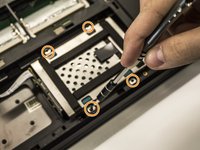
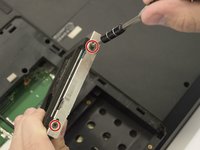
Unscrew four 6mm Phillip #0 screws from the hard drive mounting.
-
-
-
-
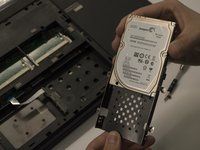
Unplug and remove the hard drive by pulling up on the black tab on top of the hard drive.
-
-




To reassemble your device, follow these instructions in reverse order.
Cancel: I did not complete this guide.
One other person completed this guide.

Team

Cal Poly, Team 5-10, Maness Spring 2015 Member of Cal Poly, Team 5-10, Maness Spring 2015
CPSU-MANESS-S15S5G10
4 Members
72 Guides authored
