
Asus F555LA-AB31 CD Drive Replacement

Darren Early and 5 other contributors
Last updated on Dec 22, 2021
Views: 799
View statistics:
- Past 24 Hours:
- 1
- Past 7 Days:
- 15
- Past 30 Days:
- 61
- All Time:
- 799
Comments: 0
No one has left comments on this guide. Will you be first?
Go to guide commentsCompleted: 0 1
No one has marked this guide "completed." Will you be the first?
1 person has marked this guide "completed." It's you — great job!
Favorites: 0 1
No one has favorited (and subscribed to) this guide. Will you be the first?
1 person has favorited (and subscribed to) this guide — and that's you!
Introduction
Go to step 1 ↓This guide has four uncomplicated and easy-to-follow steps to replace the CD drive of your Asus F555LA-AB31 laptop.
There are just two things that could be wrong with your CD drive. The first one is that you might have a faulty drive, which is highly unlikely. The second one, which is the most common problem, is faulty drivers; you may find that discs are not being read correctly.
Before completing this guide, unplug and turn off your laptop.
What you need
Tools

-
-
-
Use the Phillips #0 screwdriver head to remove the ten 18mm Phillips #0 screws on the laptop's bottom.
 Ask FixBot
-
-
-
Flip the laptop over and flip the screen up.
-
Pry upward on the edges of the faceplate in order to separate the keyboard and trackpad from the rest of the device.
-
-
-
-
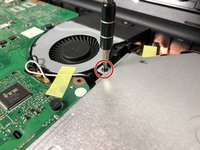
Use the Phillips #0 screwdriver to unscrew the one Phillips #0 screw that connects the CD drive to the motherboard.
-
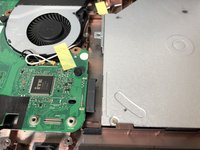
Slowly slide out the CD drive, keeping it level, to remove it.
-
-


To reassemble your device, follow these instructions in reverse order.

Team

Oregon Institute of Technology, Team S1-G1, Lancaster Spring 2019 Member of Oregon Institute of Technology, Team S1-G1, Lancaster Spring 2019
OIT-LANCASTER-S19S1G1
4 Members
72 Guides authored
