Free Shipping on Domestic Orders $75+

Asus EeeBook X205TA LED Screen Panel Chip Replacement

What you need

    1. Asus EeeBook X205TA LED Screen Panel Chip Replacement, Battery: step 1, image 1 of 2 Asus EeeBook X205TA LED Screen Panel Chip Replacement, Battery: step 1, image 2 of 2
      • Unscrew all ten 2mm screws located on the bottom of the laptop using a Phillips #2 screwdriver.

      Ask FixBot

      Add Comment

    2. Asus EeeBook X205TA LED Screen Panel Chip Replacement: step 2, image 1 of 1
      • Insert the plastic opening tool in the crevice between the back of the laptop and the rest of the case.

      • Carefully pry open the case from several points.

      • Slowly remove the back of the laptop, revealing the parts inside.

      Ask FixBot

      Add Comment

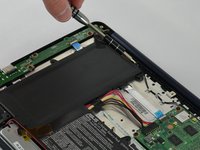
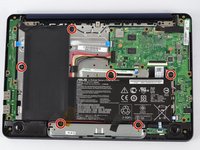
    3. Asus EeeBook X205TA LED Screen Panel Chip Replacement: step 3, image 1 of 2 Asus EeeBook X205TA LED Screen Panel Chip Replacement: step 3, image 2 of 2
      • Unscrew all six 2mm screws using Philips #2 screws along the edges of the L-Shaped battery.

      • Any tape or cords that run along the battery should be carefully pushed to the side.

      Ask FixBot

      Add Comment

    4. Asus EeeBook X205TA LED Screen Panel Chip Replacement: step 4, image 1 of 1
      • Disconnect the battery from the motherboard by pulling the No-Fuss Ribbon cables out of the connector.

      Ask FixBot

      Add Comment

    5. Asus EeeBook X205TA LED Screen Panel Chip Replacement: step 5, image 1 of 1
      • Carefully lift the battery out of the laptop.

      Ask FixBot

      Add Comment

    1. Asus EeeBook X205TA LED Screen Panel Chip Replacement, LED Screen Panel Chip: step 6, image 1 of 1
      • Locate and lift the tabs from the LED/motherboard ribbon cable.

      • Remove the cable.

      Ask FixBot

      Add Comment

    2. Asus EeeBook X205TA LED Screen Panel Chip Replacement: step 7, image 1 of 1
      • Unscrew the 1 JIS 2mm screw with the J0 bit.

      Ask FixBot

      Add Comment

    3. Asus EeeBook X205TA LED Screen Panel Chip Replacement: step 8, image 1 of 1
      • Remove the chip.

      Ask FixBot

      Add Comment

Conclusion

To reassemble your device, follow these instructions in reverse order.

Cancel: I did not complete this guide.

Rachael

Member since: 03/20/17

125 Reputation

1 Guide authored

Team

IUPUI, Team S3-G4, Baechle Spring 2017 Member of IUPUI, Team S3-G4, Baechle Spring 2017

IUPUI-BAECHLE-S17S3G4

4 Members

36 Guides authored

0 Guide Comments

Add Comment

View Statistics:

Past 24 Hours: 2

Past 7 Days: 4

Past 30 Days: 36

All Time: 1,570