Free Shipping on Domestic Orders $75+

Asus Eee PC 900 RAM Replacement

What you need

  1. Asus Eee PC 900 RAM Replacement, Battery: step 1, image 1 of 3 Asus Eee PC 900 RAM Replacement, Battery: step 1, image 2 of 3 Asus Eee PC 900 RAM Replacement, Battery: step 1, image 3 of 3
    • Slide the battery's locking tabs from the locked position to unlocked positions.

    • The right tab is unlocked when a red dot is showing.

    • The left tab will have to be held in the unlocked position in order to release the battery.

    Ask FixBot

    Add Comment

  2. Asus Eee PC 900 RAM Replacement: step 2, image 1 of 1
    • Slide the battery out while holding the left locking tab in the unlocked position.

    Ask FixBot

    Add Comment

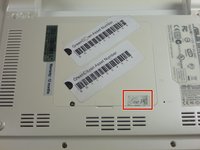
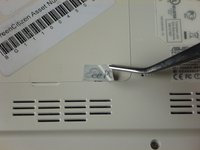
  3. Asus Eee PC 900 RAM Replacement, RAM: step 3, image 1 of 2 Asus Eee PC 900 RAM Replacement, RAM: step 3, image 2 of 2
    Tool used on this step:
    Tweezers
    $4.99
    Buy
    • Remove the sticker from the RAM compartment using a pair of tweezers.

    Ask FixBot

    Add Comment

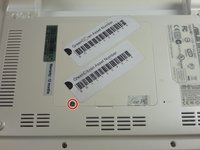
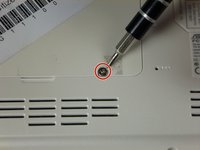
  4. Asus Eee PC 900 RAM Replacement: step 4, image 1 of 2 Asus Eee PC 900 RAM Replacement: step 4, image 2 of 2
    • Remove the two 4.8 mm screws using a Phillips #0 screwdriver.

    Ask FixBot

    Add Comment

  5. Asus Eee PC 900 RAM Replacement: step 5, image 1 of 1
    • Open up the cover from the bottom by carefully prying it open with a plastic opening tool.

    • Be gentle when prying open the cover in order to not damage it.

    Ask FixBot

    Add Comment

  6. Asus Eee PC 900 RAM Replacement: step 6, image 1 of 1
    • Remove the back cover by pulling up on the side that had the screws.

    Ask FixBot

    Add Comment

  7. Asus Eee PC 900 RAM Replacement: step 7, image 1 of 2 Asus Eee PC 900 RAM Replacement: step 7, image 2 of 2
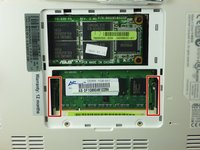
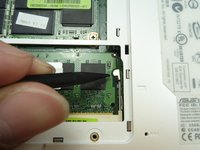
    • Use a spudger to push the top of the pin on the right towards the right (so it isn't holding the RAM chip).

    • Do the same for the left pin. Push the top of the pin towards the left.

    • The RAM should pop up.

    Ask FixBot

    Add Comment

  8. Asus Eee PC 900 RAM Replacement: step 8, image 1 of 1
    • Remove the RAM chip by grabbing the top of the chip and pulling it upwards.

    • Be gentle when removing the RAM because it is a very delicate part and you do not want to break any of the pins in the computer.

    Ask FixBot

    Add Comment

Conclusion

To reassemble your device, follow these instructions in reverse order.

Cancel: I did not complete this guide.

5 other people completed this guide.

Brian Carreon

Member since: 01/25/12

300 Reputation

2 Guides authored

Team

Cal Poly, Team 3-27, Amido Winter 2012 Member of Cal Poly, Team 3-27, Amido Winter 2012

CPSU-AMIDO-W12S3G27

4 Members

16 Guides authored

0 Guide Comments

Add Comment

View Statistics:

Past 24 Hours: 3

Past 7 Days: 7

Past 30 Days: 40

All Time: 9,799