Free Shipping on Domestic Orders $75+

Asus Chromebook Flip C302CA Back Panel Replacement

What you need

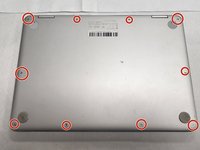
  1. Asus Chromebook Flip C302CA Back Panel Replacement, Back Panel: step 1, image 1 of 1
    • Turn the laptop over so the bottom is facing you.

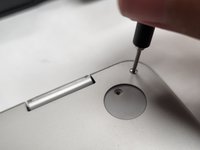
  2. Asus Chromebook Flip C302CA Back Panel Replacement: step 2, image 1 of 3 Asus Chromebook Flip C302CA Back Panel Replacement: step 2, image 2 of 3 Asus Chromebook Flip C302CA Back Panel Replacement: step 2, image 3 of 3
    • Remove two rubber caps on the top.

    • Remove the two 1 mm screws using the Phillips #00 screwdriver.

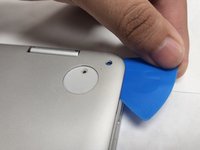
  3. Asus Chromebook Flip C302CA Back Panel Replacement: step 3, image 1 of 3 Asus Chromebook Flip C302CA Back Panel Replacement: step 3, image 2 of 3 Asus Chromebook Flip C302CA Back Panel Replacement: step 3, image 3 of 3
    • Remove the ten 2 mm screws from the back panel using a T5 Torx screwdriver.

    • Carefully remove the back panel using an opening pick.

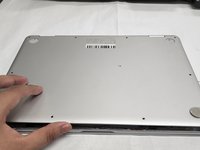
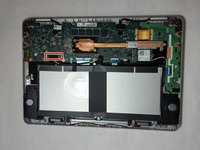
  4. Asus Chromebook Flip C302CA Back Panel Replacement: step 4, image 1 of 2 Asus Chromebook Flip C302CA Back Panel Replacement: step 4, image 2 of 2
    • Remove the back panel from the laptop.

Conclusion

To reassemble your device, follow these instructions in reverse order.

One other person completed this guide.

Kristen Gismondi

Member since: 11/12/14

106,000 Reputation

267 Guides authored

Team

iFixit Member of iFixit

Staff

123 Members

25,681 Guides authored

0 Guide Comments

Add Comment

View Statistics:

Past 24 Hours: 1

Past 7 Days: 8

Past 30 Days: 32

All Time: 337